SEO Title: Need an Apple ID Code? Get a Verification Number with OTPGET
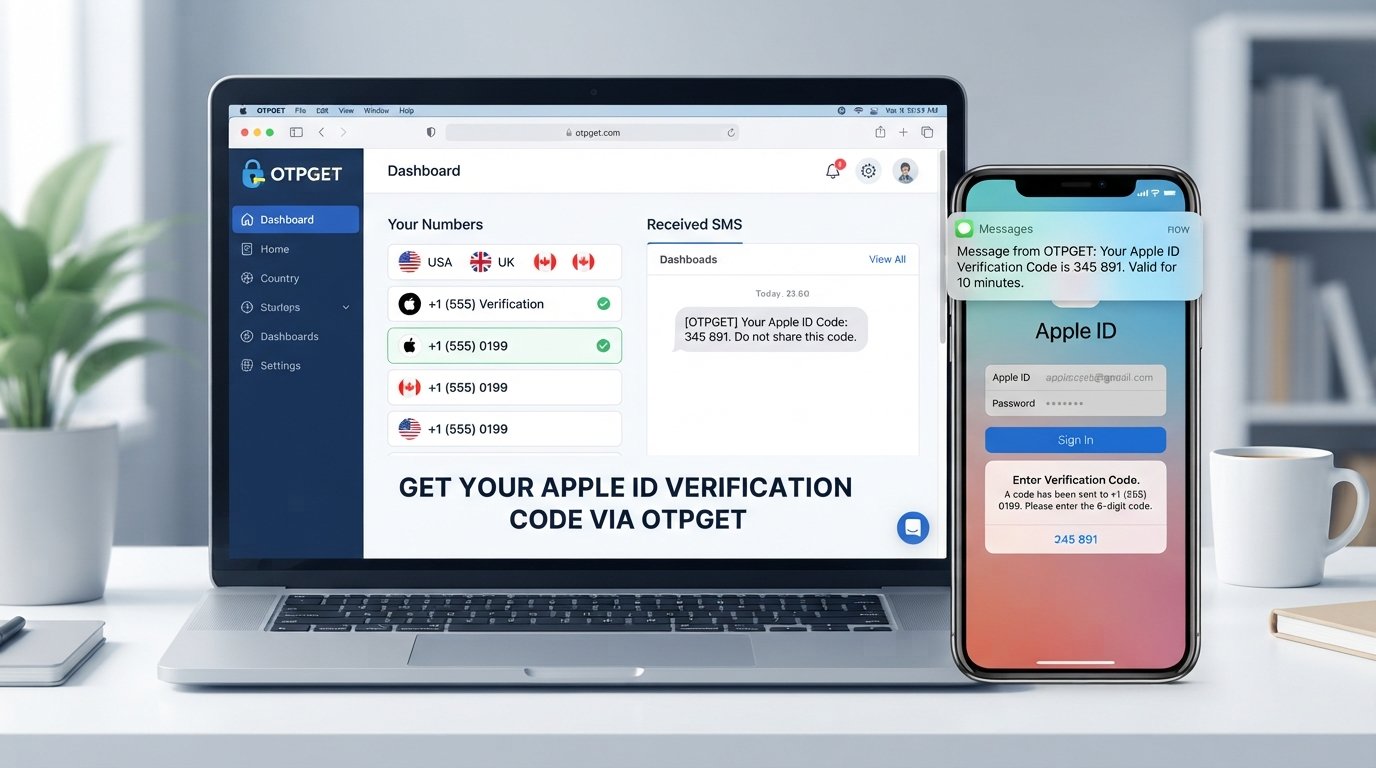
Need an Apple ID Code? Get a Verification Number with OTPGET
Creating or accessing an Apple ID is usually straightforward, but the process can become frustrating when you reach the phone verification step and need an SMS-capable number. If you do not want to use your personal number, or you need a separate number for a legitimate verification purpose, finding a suitable option can be the hardest part.
An Apple ID verification code is an important part of account security. It helps confirm that the person completing the verification process has access to the phone number being used. When the verification request is accepted, a code can be sent by SMS for entry into the relevant verification screen.
This is where an OTP receiving service such as OTPGET can be useful. Rather than relying on your primary personal number for every verification situation, you can consider using an appropriate number through OTPGET for SMS-based OTP verification, subject to the requirements and acceptance of the service being verified.
Why Do You Need an Apple ID Verification Code?
An Apple ID verification code is a temporary code used to confirm access to a phone number during an account or security-related verification process.
Phone verification adds another layer of protection because a verification code is delivered to a number that the user is expected to control. This makes it more difficult for someone without access to the verification channel to complete certain account actions.
You may be asked for a phone number when you:
-
Sign up for an Apple ID.
-
Complete an account verification step.
-
Confirm account-related information.
-
Attempt an action that requires additional security verification.
-
Need to confirm access to a particular phone number.
The exact verification experience can vary depending on the account, device, region, and security requirements involved. The important point is that receiving the SMS is only one part of the process. The verification system must also accept the number and the information provided.
What to Do If You Need an Apple ID Code
If you need an Apple verification code, the general process is simple. The specific screens and wording may differ, so follow the instructions presented by Apple during your own verification process.
-
Begin the account or verification process. Start from the legitimate Apple account or device workflow that is requesting verification.
-
Provide the required phone number. Enter a number that is suitable for the verification request.
-
Request the verification code. If the request is accepted, an SMS verification code may be sent to the number.
-
Check for the incoming SMS. Look at the appropriate SMS or OTP inbox associated with the number.
-
Enter the received code. Carefully enter the Apple ID verification code where requested.
-
Complete the verification process. Continue with the instructions shown on the verification screen.
If the code does not arrive, do not assume that repeatedly requesting new codes will solve the issue. First check the number, country or region information where applicable, and whether the number is appropriate for the particular verification request.
How OTPGET Can Help You Receive a Verification Code
For people who need a separate number for SMS verification, OTPGET can serve as a practical option for receiving an OTP.
The basic idea is straightforward: you obtain an appropriate verification number, use it for a legitimate verification request that accepts that type of number, and then check the associated OTP receiving service for the incoming verification SMS.
The workflow can be thought of as:
Choose a suitable number → enter it for legitimate verification → request the SMS → retrieve the OTP → enter the code into the verification screen.
This can be convenient when you prefer not to use your everyday personal number for a particular verification situation.
However, it is important to keep expectations realistic. OTPGET does not bypass Apple's security controls, and no third-party number should be assumed to work with every account or verification request. Acceptance ultimately depends on the verification system and its requirements.
Why Use OTPGET for OTP Verification?
There are several practical reasons someone may consider using a separate OTP receiving number instead of their primary phone number.
Keep verification messages separate
Using a dedicated verification number can help keep account-related SMS messages separate from your normal personal communications.
Reduce reliance on your personal number
Some users simply prefer not to provide their primary number whenever a separate number is appropriate for a legitimate verification purpose.
Simplify SMS-based verification
An OTP receiving service can provide a focused place to check for incoming verification messages rather than mixing them with everyday texts.
Support temporary verification needs
A separate number can be useful for situations where you need a verification channel without making your main phone number the default choice.
These advantages do not mean that a separate number is always the best option. If Apple specifically requires information or verification methods associated with your existing account, follow those requirements rather than trying to work around them.
How to Get an Apple ID Code Using OTPGET
If you have decided that a separate number is appropriate for your verification situation, the process can be approached step by step.
Step 1: Choose a suitable number
Start by selecting an OTP receiving number through OTPGET that matches the requirements of the verification process you are completing.
Pay attention to any country or number-format requirements shown during verification.
Step 2: Enter the number
Use the selected number in the legitimate Apple account verification process where a phone number is requested.
Double-check the digits before continuing. A simple number-entry mistake can prevent the SMS from reaching the intended destination.
Step 3: Request the code
Submit the verification request through the relevant account or device screen. If the number is accepted for the request, the verification system may send an SMS containing a temporary code.
Step 4: Check OTPGET
Return to the appropriate OTPGET interface and check for the incoming verification SMS.
The code should be treated as sensitive information because anyone with access to it may potentially use it to complete the associated verification step.
Step 5: Enter the verification code
Once you receive the Apple ID code, enter it carefully into the verification screen.
Avoid sharing the code with another person or entering it into an unrelated website.
Step 6: Complete verification
If the code is accepted, continue through the remaining account setup or verification instructions.
Successful verification depends on Apple's own requirements, the number used, and the circumstances of the request. A third-party OTP service cannot guarantee acceptance for every verification scenario.
Benefits of Using a Separate Verification Number
A personal phone number can be perfectly appropriate for Apple account verification. Still, there are legitimate situations where a separate verification number may be more convenient.
For example, a secondary number can help you:
-
Keep verification SMS messages separate from personal texts.
-
Avoid using your primary number for every online verification request.
-
Manage OTP messages in a dedicated place.
-
Handle temporary or secondary verification requirements.
-
Reduce unnecessary exposure of your everyday phone number.
The key is to use a separate number responsibly. Verification services should support legitimate account activity, not attempts to defeat security controls or misrepresent identity.
Apple ID Code Not Arriving? What to Check
Not receiving an Apple verification code can happen for several reasons. Before trying repeatedly, work through the basics.
Check the phone number. Make sure every digit and the selected country or region are correct where applicable.
Check the OTP inbox. If you are using OTPGET, make sure you are looking at the correct number and its associated SMS messages.
Consider delivery delays. SMS messages may occasionally take time to arrive because of network or service conditions.
Confirm that the number is suitable. Not every number is accepted for every verification request. Some services may restrict particular number types.
Avoid excessive attempts. Repeated requests can make troubleshooting more difficult. If you have already submitted several requests, review the information first rather than continuously requesting another code.
Check for temporary service issues. Problems can occur on either side of an SMS delivery process.
Request another code only when appropriate. If the previous request has expired or is no longer valid, follow the verification screen's instructions for requesting a new one.
If the issue continues, use the official account support or recovery options provided by Apple rather than attempting to bypass the verification process.
OTPGET vs. Using Your Personal Phone Number
Using your personal phone number and using a separate OTP number both have legitimate use cases.
Your personal number may be the better choice when you want a long-term phone number associated with your account and are comfortable using it for verification.
A separate verification number can be more convenient when you want to keep verification traffic separate or have a specific legitimate need for another number.
For readers specifically looking for a separate number for SMS-based verification, OTPGET is a practical option to consider. The important distinction is that it is a separate service, not an Apple product or an Apple-endorsed verification method.
Choose the approach that fits your situation while following the account provider's requirements.
Is Using an OTP Number Safe?
An OTP number should be used thoughtfully. SMS verification is designed to confirm access to a phone number, but it is not a substitute for responsible account security.
Keep these practices in mind:
-
Use verification services only for legitimate purposes.
-
Never share your Apple ID password with an OTP provider or another person.
-
Never share verification codes unnecessarily.
-
Do not use an OTP number to bypass security controls.
-
Follow Apple's account and verification requirements.
-
Treat received codes as sensitive information.
-
Remember that SMS verification is only one part of broader account security.
If a verification request looks suspicious or asks you to provide confidential credentials outside the normal account process, stop and verify what is being requested before proceeding.
Frequently Asked Questions
What is an Apple ID verification code?
An Apple ID verification code is a temporary code used during certain account or security verification processes. It helps confirm access to the phone number receiving the SMS.
Why do I need a phone number for Apple ID?
A phone number can be used as part of account verification and security processes. It provides a way to confirm access to a particular communication channel when verification is required.
How can I receive an Apple ID code?
Follow the legitimate Apple verification process, provide an appropriate phone number when requested, and check the corresponding SMS inbox for the verification code.
Can OTPGET provide a number for OTP verification?
OTPGET can be considered when you need a separate number for legitimate SMS or OTP verification. Whether a particular number is accepted depends on the requirements of the service requesting verification.
How do I receive an OTP through OTPGET?
Generally, you select an appropriate number, use it for the legitimate verification request, and then check the relevant OTPGET SMS or OTP inbox for the incoming verification message.
What should I do if my Apple verification code does not arrive?
First check the phone number, country or region information where applicable, and the relevant SMS inbox. Also consider delivery delays, number compatibility, expired requests, and repeated verification attempts.
Can I use a temporary phone number for verification?
A temporary or secondary phone number may be suitable for some legitimate verification situations, but acceptance depends entirely on the service performing the verification. It should not be used to bypass security requirements.
Is OTPGET suitable for receiving verification SMS?
OTPGET is designed around SMS/OTP receiving use cases, making it an option for people who need a separate verification number. However, users should always confirm that the number type is appropriate for their specific verification request.
Need an Apple ID Code? Consider OTPGET
When you need an Apple ID verification code, the real challenge is often having access to a suitable phone number that can receive the required SMS. Your personal number may be the simplest choice, but it is not always the option you want to use.
For legitimate situations where a separate verification number makes sense, OTPGET can help simplify the SMS-based OTP process. You can use an appropriate number, check for the incoming verification message, and enter the received code into the relevant verification screen.
Just remember that verification is controlled by the service requesting the code. OTPGET does not guarantee that every number will be accepted, and it should never be used to bypass Apple's security measures.
If you need a convenient way to handle SMS-based verification while keeping your personal number separate, explore OTPGET and see whether its available verification-number options fit your needs.