Buy a Number on OTPGet.com – Pick App, Get Code
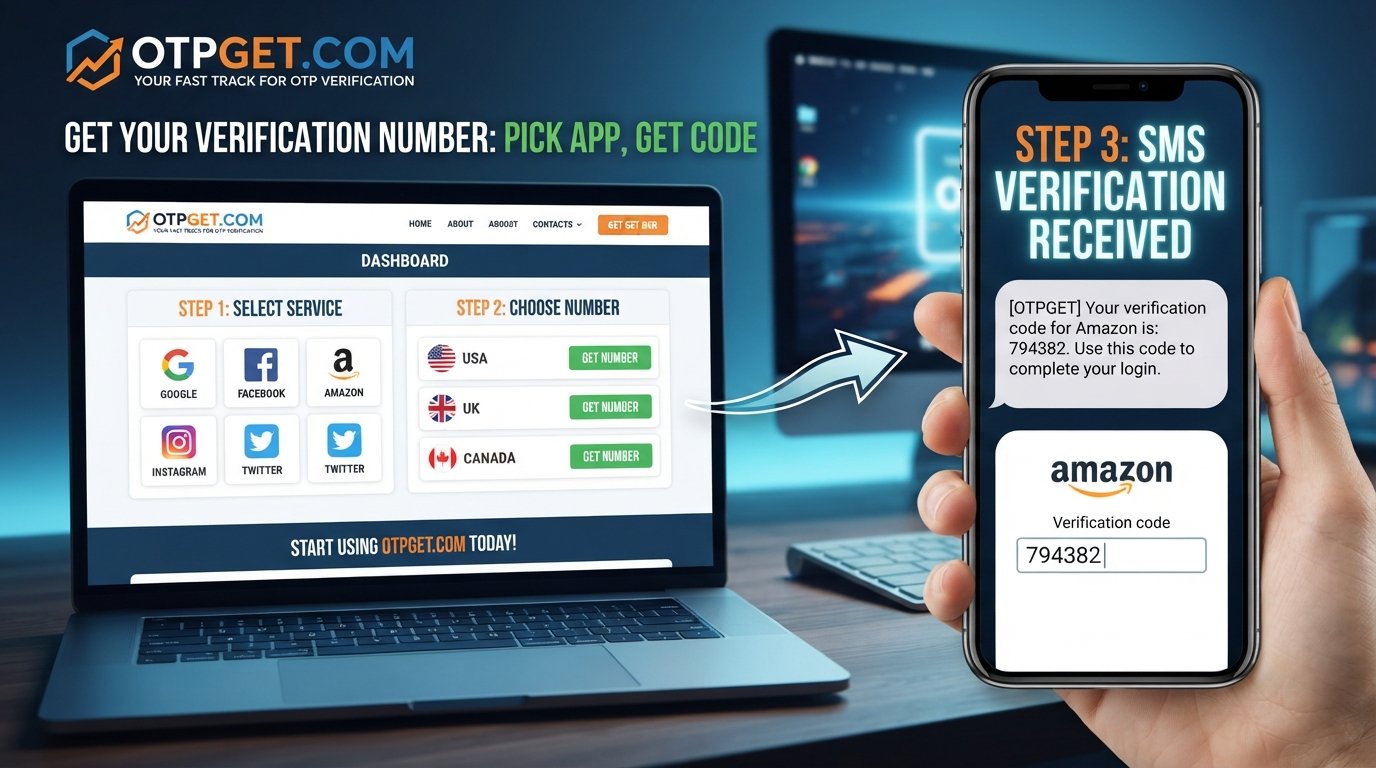
BUY A NUMBER ON OTPGET.COM – PICK APP, GET CODE
Phone verification has become a routine part of using websites and apps. A service may ask for a number before allowing you to create an account, confirm an action, or complete a verification step. For many people, using a personal phone number for every online service is not always convenient.
That is where a dedicated number for OTP verification can be useful.
An OTP, or one-time password, is usually sent by SMS to confirm that a person has access to the phone number entered during verification. Instead of relying on your personal number for every legitimate online service, you can use an appropriate number intended for receiving verification messages.
OTPGET provides a straightforward approach: choose the app or service you need, select an available number, and use it to receive the verification code. The exact availability and acceptance of a number depend on the service you are verifying with, but the basic process is simple to understand.
What Is an OTP Verification Number?
An OTP verification number is a phone number used to receive a one-time password or verification code by SMS.
An OTP is generally a short code that a website or app sends to a phone number during an account verification or security check. After receiving the code, the user enters it into the relevant verification field. The service then checks whether the code matches the one it sent.
For example, a typical verification process may look like this:
-
A website or app asks for a phone number.
-
You provide an eligible number.
-
The service sends an SMS verification code.
-
You receive the SMS.
-
You enter the verification code.
-
The service completes its verification step if the code is accepted.
A verification number can be useful when you want to keep verification-related messages separate from your everyday personal SMS.
It is also worth remembering that an OTP number does not override a platform's own rules. Each website or app decides which number types it accepts and how its phone verification system works.
Why People Need a Number for OTP Verification
There are several legitimate reasons someone may want a separate phone number for verification.
Keeping personal and online activity separate is one common reason. Your personal number may be connected to family, work, banking, and other important communications. Using a separate number for appropriate online verification can help keep those activities organized.
A dedicated number can also make SMS verification easier to manage. Instead of having verification messages mixed with personal conversations, you can use a number specifically for the service or verification task where appropriate.
Another use case is application testing or service evaluation, provided the activity is permitted by the relevant platform. Developers, testers, and regular users may sometimes need a number for legitimate testing or verification workflows.
There is also a simple convenience factor. If you need to receive an OTP online, having a service designed around verification numbers can be easier than trying to manage every verification request through a personal phone.
The key is responsible use. A phone number for OTP should be used for legitimate purposes and in accordance with the terms and verification policies of the service involved.
Buy a Number on OTPGet.com – How It Works
If you need to buy a number on OTPGet.com for a legitimate verification task, the basic workflow is designed to be easy to follow.
1. Visit OTPGet.com
Start by accessing OTPGet.com and reviewing the available options.
2. Choose the required app or service
Select the app or service for which you need a verification number. Availability can vary, so the options shown to you may depend on the service and numbers currently available.
3. Select an available number
Choose a suitable number from the available options. If country or number type matters for the service you are using, consider those requirements before proceeding.
4. Use the number for phone verification
Enter the selected number in the phone verification field of the relevant website or app.
5. Wait for the verification SMS
If the third-party service sends a verification message to the number, the SMS containing the OTP or verification code can be received through the applicable OTPGET workflow.
6. View the OTP
Check the received message and identify the verification code.
7. Enter the code
Return to the verification screen and enter the OTP accurately.
8. Complete verification
If the code is valid and the third-party service accepts the number, the verification process can be completed.
The exact interface, number availability, and verification behavior can vary. Rather than assuming that every app follows the same process, always follow the instructions displayed by the service you are verifying.
Why Choose OTPGET for Receiving Verification Codes?
When the goal is simply to get a number for receiving an OTP, unnecessary complexity can make the process frustrating. OTPGET focuses on the basic workflow users need: selecting a number for an app or service and receiving the corresponding verification message.
One practical advantage is number selection based on the app or service. Instead of treating every verification request as identical, users can look for an available option appropriate for their particular need.
The workflow is also centered around OTP access. Once a verification SMS is sent to the selected number, the user can retrieve the code and enter it where required.
For people who prefer not to use their personal phone number for every legitimate online verification request, this can provide a more convenient alternative.
Most importantly, OTPGET should be viewed as a practical tool rather than a way to bypass platform rules. Third-party services remain responsible for their own account verification requirements, and acceptance of a particular number is ultimately determined by those services.
How to Pick the Right Number for Your App
Choosing a number is not simply about picking the first option you see. The requirements of the app or service matter.
Before selecting a number, consider:
-
The specific app or service: Start with the platform where the verification will take place.
-
Number availability: Suitable numbers may vary depending on what is currently available.
-
Country requirements: Some services may apply country-specific verification rules.
-
Number type: Check whether the service accepts the type of number you intend to use.
-
SMS requirements: Make sure the number is appropriate for receiving the required verification SMS.
-
Third-party policies: Review the relevant platform's terms if you are unsure whether a particular number type is permitted.
There is no universal OTP receiving number that every app must accept. Some platforms may restrict certain number types, locations, or virtual numbers. This is why selecting a number based on the specific verification requirement is important.
OTPGET vs. Using Your Personal Number
A personal number can work perfectly well for many verification situations. However, a separate OTP receiving number may be more convenient when you want to keep verification messages apart from personal communications.
| Factor | Personal Number | OTPGET |
|---|---|---|
| Separation from personal SMS | Limited | More convenient for dedicated verification use |
| Dedicated verification use | Not always practical | Designed around OTP-focused use |
| Number selection | Usually limited to your own number | Select based on available options |
| Convenience | Depends on the situation | Straightforward verification-focused workflow |
| App-specific selection | Generally not applicable | Can be based on available app/service options |
This is not a claim that one approach is always better. Your choice should depend on the service, its verification requirements, and your own needs.
Tips for a Smooth OTP Verification Process
A few simple habits can make receiving an OTP much easier.
Select the correct app or service first. Using a number intended for a different service may not produce the result you expect.
Double-check the number before submitting it. A small mistake can prevent the verification SMS from reaching the intended number.
Give the SMS system time to respond. Delivery can depend on the third-party platform, its SMS provider, and network conditions.
Avoid repeatedly requesting codes. Multiple requests can sometimes create confusion if several verification messages arrive or if an older code becomes invalid.
Enter the OTP carefully. Verification codes are often short, so one incorrect digit can cause the verification attempt to fail.
Check compatibility. If a service does not accept the number type you selected, another available option may be necessary.
Most importantly, never share an OTP with another person. A verification code is intended for the verification process associated with your account or activity.
Use an OTP number only for legitimate purposes and follow the rules of the website or app involved.
Common Questions About OTP Numbers
Can I buy a number specifically for OTP verification?
Yes, services such as OTPGET are designed around the need to obtain a number for receiving verification messages. Available numbers and supported services can vary, so choose an option that matches your intended verification use.
How do I receive an OTP online?
The general process is simple: select an appropriate number, enter it into the relevant phone verification field, wait for the SMS, and retrieve the verification code. With OTPGET, the workflow is focused on helping users choose a number and access the OTP associated with it.
Can I choose a number for a specific app?
You can select based on the app or service options available to you. However, availability is not universal, and each third-party platform has its own verification requirements.
How quickly does a verification code arrive?
There is no single delivery time that applies to every OTP. The speed can depend on the third-party service, SMS system, network conditions, and other factors. If a code does not appear immediately, check that the number was entered correctly before requesting another one.
Will every app accept an OTP number?
No. Acceptance depends on the individual app's verification policies. Some services may restrict certain number types or virtual numbers. OTPGET cannot override those third-party requirements.
Is it safe to share an OTP?
You should not share verification codes with other people. An OTP is a security credential associated with a verification attempt. Treat it as private and enter it only into the legitimate verification screen where it was requested.
What should I do if I do not receive the OTP?
First, confirm that you selected the correct app or service and entered the number correctly. Then check whether the verification message has arrived. Avoid repeatedly requesting codes too quickly. If the SMS still does not arrive, the issue may be related to the third-party service, its verification rules, or SMS delivery rather than the number itself.
Get Your OTP Verification Number with OTPGET
If you need a convenient way to get a number for receiving a verification code, OTPGET offers a straightforward place to explore available options based on the app or service you need.
The process is simple in principle: pick the app, choose an available number, receive the SMS, and enter the verification code.
Whether you need an online number for verification, a temporary number for OTP, or simply want to keep verification messages separate from your personal SMS, the right number can make the process more manageable.
Visit OTPGet.com to explore the available options and choose a number that fits your legitimate verification needs.
Conclusion
Phone verification is now a normal part of many online services, but that does not mean you always need to use your personal number for every verification request. A dedicated OTP receiving number can provide a practical way to separate verification messages from everyday communications.
OTPGET keeps the concept straightforward: choose the relevant app or service, select an available number, receive the verification SMS, and use the code where required.
Just remember that third-party platforms control their own verification policies, so no number provider can guarantee acceptance by every service.
If you need a number for legitimate OTP verification, explore OTPGet.com, pick the appropriate option, and get your verification code through a simple, focused workflow.


