OTPGET Login and Dashboard Access: A Simple, Clear User Guide
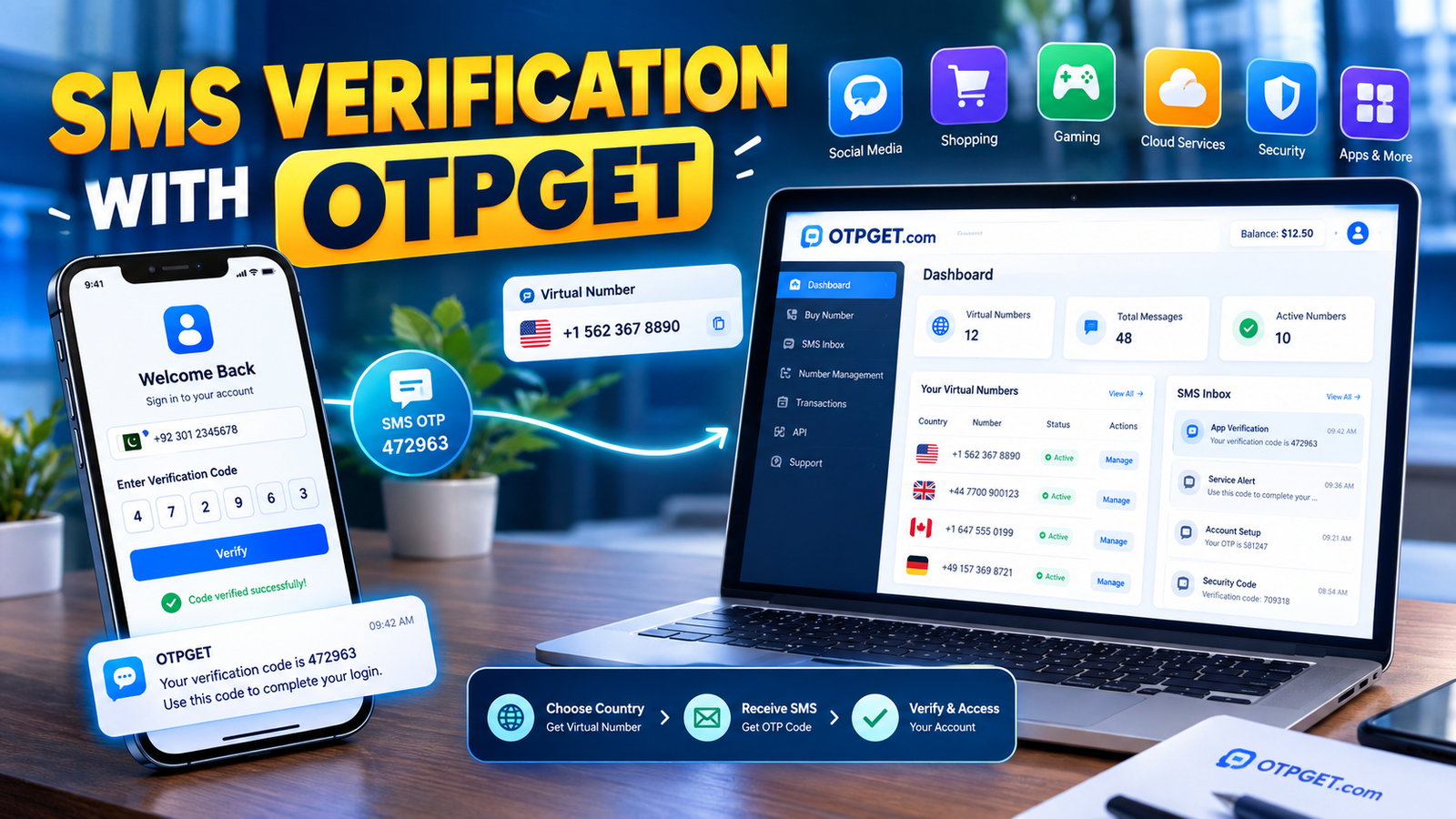
Login and Dashboard Access Made Easy
Finding the right login page is often the first challenge when you need access to an OTP service. Once you are inside, the next question is usually just as important: where do you find the tools or information you need?
OTPGET login is designed around access to an OTP-focused platform, while the OTPGET dashboard provides a central place for managing verification-related activity. For users who need virtual numbers, SMS-based verification, or other OTP-related services, having a clear path from login to dashboard can make the overall process easier to understand.
This guide explains what OTPGET is, how OTPGET login works in general, what you can expect from the dashboard, and how to troubleshoot common access problems.
OTPGet
What Is OTPGET?
OTPGET is a platform focused on virtual phone numbers and OTP verification. Its website describes services that include virtual numbers for SMS OTP verification, longer-term number rentals, temporary email options, and developer API access.
In simple terms, OTPGET can help users who need to receive a one-time password, commonly called an OTP, during a supported verification process.
An OTP is a temporary verification code used to confirm that a person has access to a particular phone number, email address, or authentication channel. Instead of relying only on a password, a service may request an additional code before completing an action.
A dedicated OTP solution can make these workflows easier to organize, particularly when verification codes, numbers, services, or account activity need to be handled from a central interface.
Why Easy OTPGET Login Matters
Login is more than simply entering a username and password. It is the gateway to the services and account information available after authentication.
When users search for the OTPGET login page, they are usually trying to accomplish something specific. They may want to access their dashboard, check verification activity, obtain an available number, or continue an OTP-related workflow.
A straightforward login experience helps reduce unnecessary confusion.
Common concerns include:
- Finding the correct official login location
- Remembering the credentials associated with an account
- Completing any required verification
- Reaching the dashboard without unnecessary steps
- Understanding where relevant OTP options are located
For that reason, OTPGET dashboard access is an important part of the overall user experience. Once authenticated, users can work from a centralized environment rather than trying to manage every verification step separately.
How to Access OTPGET Login
The safest approach is to begin from the official OTPGET website rather than relying on an unfamiliar third-party link.
Visit the official OTPGET website
The general process is straightforward:
- Navigate to the official OTPGET website.
Start from the official source so you can avoid confusing or potentially misleading login pages. - Locate the login option.
Use the site's current navigation to find the appropriate account login area. - Enter your account credentials.
Provide the credentials associated with your OTPGET account. Never share passwords or private account information with another person. - Complete any required verification.
If the account or login process asks for an additional verification step, follow the instructions displayed on the official site. - Open the dashboard.
After successful authentication, proceed to the available account or dashboard area. - Review the available options.
Depending on the services available to your account, the dashboard may provide access to OTP-related tools and account activity.
The exact layout, labels, or login flow can change, so it is better to follow the current instructions shown by OTPGET rather than relying on an old screenshot or unofficial guide.
Understanding the OTPGET Dashboard
The OTPGET dashboard serves as a central point for OTP-related activity. A dashboard is useful because it puts relevant account functions into an organized interface.
According to OTPGET's website, its platform includes virtual numbers for OTP verification and services such as number rentals and temporary email options. Its developer documentation also describes API-based access for supported OTP workflows.
For a user, the practical advantage of a dashboard is organization.
Instead of treating every verification request as a separate process, a centralized interface can make it easier to understand what is happening, what resources are available, and which step comes next.
The dashboard concept is particularly useful for users who regularly work with verification codes or need to distinguish between different OTP-related activities.
Common OTPGET Login Issues and Simple Solutions
Even a straightforward login can occasionally run into problems. Most issues can be approached systematically.
Incorrect credentials
If the login does not work, first check that the username, email, or password has been entered correctly. Watch for accidental spaces, capitalization differences, or browser autofill errors.
If you have forgotten your credentials, use the account recovery instructions provided through the official OTPGET interface.
Trouble finding the login page
Search results can sometimes contain old pages, third-party references, or unrelated results. Start from the official OTPGET website and use its current navigation to locate the appropriate account access option.
Verification code not arriving
If an OTP or verification code does not appear, check that the relevant contact information is correct and that your connection is working properly.
For SMS OTP, also allow a reasonable amount of time for message delivery before requesting another code.
Expired OTP
One-time passwords are designed to be temporary. If a code has expired, request a new verification code through the service you are trying to authenticate with.
Browser or connectivity problems
A weak connection, outdated browser, blocked scripts, or temporary browser issues can interfere with login pages. Try refreshing the page, checking your connection, or using an updated browser.
Temporary access problems
If the site or a particular function appears unavailable, avoid repeatedly submitting login attempts. Wait briefly and check the official OTPGET resources for any relevant information.
Why OTP Verification Is Important
OTP verification uses a temporary code to provide an additional authentication step. The code is generally valid for a limited period and is intended for a specific verification event.
For example, a website might ask for a one-time password after a user enters account credentials. The verification code helps confirm access to the associated authentication channel.
OTP authentication can be useful for:
- Account verification
- Login verification
- Confirming access during registration
- Adding an extra authentication step
- Reducing reliance on passwords alone
An OTP may arrive through SMS, email, or another supported authentication method. The exact process depends on the service requesting the verification.
For users working with multiple verification workflows, an organized OTP service can make the process easier to manage.
Why Choose OTPGET for OTP-Related Access?
The main value of OTPGET is its focus on OTP-related services rather than making users piece together separate tools for every verification requirement.
OTPGET's official platform currently describes virtual phone numbers for SMS OTP verification, rental numbers, temporary email services, and API options for developers.
That makes OTPGET a practical option to consider when your use case legitimately requires an OTP-focused service.
The potential benefits are straightforward:
- Simplicity: A dedicated service can reduce unnecessary complexity around verification workflows.
- Centralized access: The dashboard provides a single environment for relevant account and OTP activity.
- Convenience: Users can work with OTP-related resources through an online platform rather than relying exclusively on physical SIM-based workflows.
- Flexible use cases: OTPGET provides different service options, including virtual numbers, rentals, temporary email, and developer-oriented API access.
- Clearer workflows: Having account access and verification-related services in one place can make repeated tasks easier to organize.
As with any OTP solution, users should make sure their intended use complies with the rules of the website, application, or service being verified.
Tips for a Smoother OTPGET Login Experience
A few simple habits can prevent common access problems:
- Use the official OTPGET website or login location.
- Keep your account credentials private.
- Check your internet connection before troubleshooting the account itself.
- Make sure verification details are entered correctly.
- Enter OTP codes promptly because temporary codes can expire.
- Avoid requesting multiple codes repeatedly unless necessary.
- Keep your browser updated.
- Do not share OTPs, passwords, or API credentials with other people.
- If you cannot access your account, follow the official recovery or support instructions provided by OTPGET.
The goal is simple: reduce avoidable problems before they interrupt your verification workflow.
OTPGET Login vs. Traditional Verification Workflows
Traditional verification can involve manually coordinating phone numbers, SMS messages, codes, and account information. That approach may become inconvenient when verification tasks are repeated.
An OTP-focused service provides a more centralized approach.
| Traditional workflow | OTP-focused workflow |
|---|---|
| Verification resources may be handled separately | Relevant resources can be managed through a dedicated service |
| Greater reliance on manual coordination | More organized verification workflow |
| Codes may be harder to track across tasks | OTP activity can be accessed through a central environment |
| Physical SIM use may be necessary for some workflows | Virtual-number options may be available where supported |
| Developers may need to build their own integrations | API options can be available for supported use cases |
This does not mean an OTP service is the right choice for every situation. The best approach depends on the requirements of the website, application, account, and verification process involved.
For users specifically looking for centralized OTP access, however, OTPGET provides a focused solution worth exploring.
Frequently Asked Questions About OTPGET Login
What is OTPGET?
OTPGET is an online platform focused on OTP verification services. Its offerings include virtual phone numbers for SMS verification, number rental options, temporary email services, and API access for supported workflows.
How do I access OTPGET login?
Start with the official OTPGET website and use its current navigation to locate the account login option. Enter your registered credentials and complete any verification requested by the site. Avoid relying on unofficial login links.
Where can I find the OTPGET dashboard?
The dashboard is available after you successfully access your OTPGET account. The exact appearance and available options may depend on the current platform interface and services associated with your account.
What should I do if my OTP does not arrive?
First, confirm that the relevant number or email information is correct and that your connection is working. Give the message a reasonable amount of time to arrive. If the code remains unavailable, follow the official instructions associated with the verification process.
What is an OTP verification code?
An OTP verification code is a temporary code used to confirm access during an authentication or verification process. It is generally intended for one-time use or a limited validity period.
Is OTPGET useful for OTP-related verification?
OTPGET is specifically focused on OTP and verification-related services. Its platform offers options such as virtual numbers, SMS OTP verification, rentals, temporary email, and developer API access.
Why is OTP authentication important?
OTP authentication adds a temporary verification step beyond a basic password. It can help confirm that a user has access to the relevant phone number, email account, or other authentication channel required by a service.
What should I do if I cannot access my OTPGET account?
Check your credentials, connection, and browser first. If the issue continues, use the official OTPGET account recovery or support instructions rather than relying on unofficial assistance.
Final Thoughts
Easy account access matters when the goal is to complete an OTP-related task without unnecessary confusion. A clear login path helps users reach the right environment, while an organized dashboard can make verification-related activity easier to manage.
OTP verification itself remains a practical authentication method because it uses temporary codes to add an additional verification step. For users who need an OTP-focused service, choosing a platform built around these workflows can reduce friction.
OTPGET is a practical solution to explore for users looking for virtual-number, SMS OTP, temporary-email, or related verification services. The best place to begin is the official OTPGET website, where users can review the current login options and available services.


