Sign Up for Instagram Using an OTPGet Number: Complete Guide
Sign Up for Instagram Using an OTPGet Number: A Practical Guide
reating an Instagram account is usually straightforward, but phone verification can add an extra step. Depending on Instagram's signup flow and security checks, you may be asked to provide a phone number and enter an SMS verification code before completing registration.
For users who would rather not use their primary personal number for a one-time verification, an OTP receiving number can be a practical alternative. This is where OTPGET can be useful. Instead of immediately giving a personal phone number to a third-party platform, users can explore an OTPGet number when Instagram supports the selected number for SMS verification.
In this guide, you'll learn what an OTPGet number is, how the Instagram OTP process works, how to sign up using OTPGET, and what to do if the verification code does not arrive. We'll also cover the limitations of temporary and virtual numbers so you can choose the approach that makes the most sense for your situation.
What Is OTPGET?
OTPGET is an OTP receiving solution designed to provide access to phone numbers that can receive SMS verification messages online when supported by the relevant service.
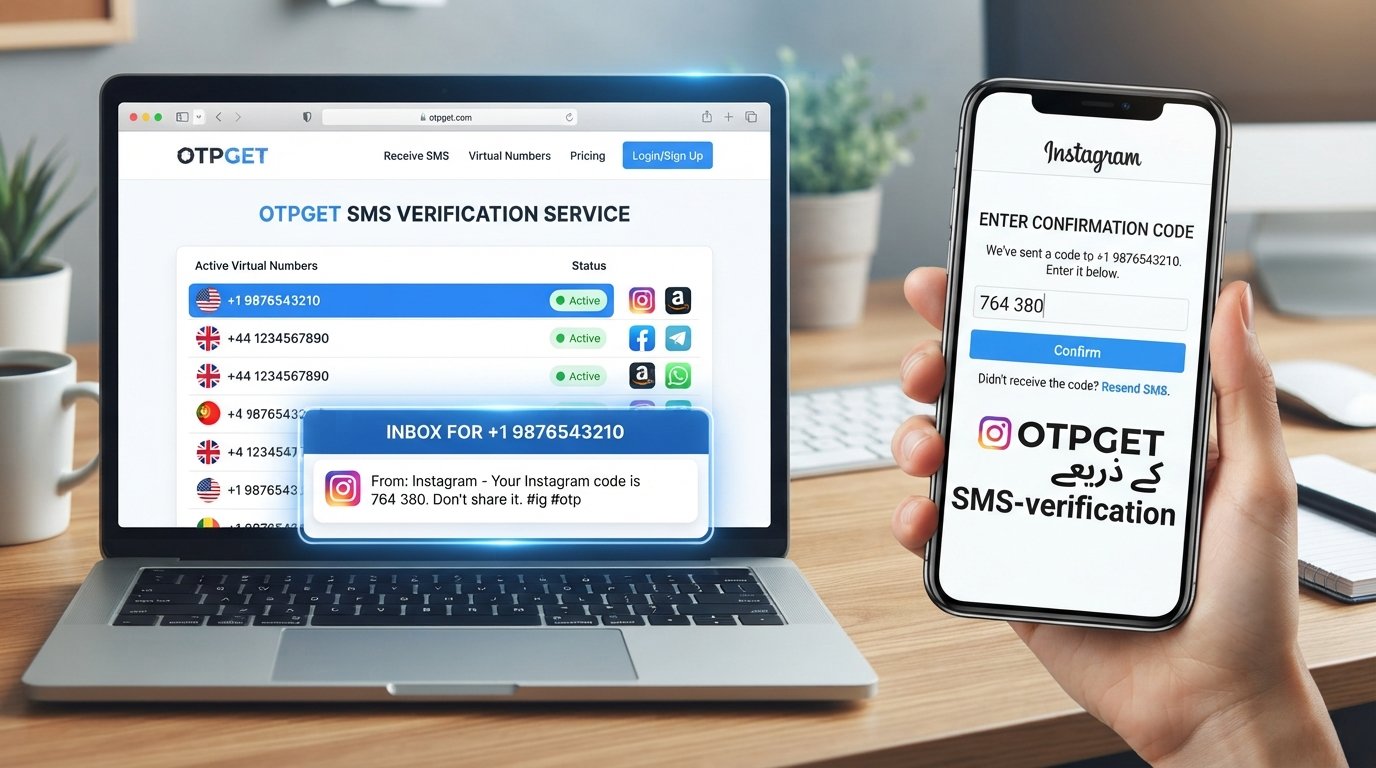
An OTP receiving number is essentially a phone number used to receive a one-time password or verification code by SMS. Rather than receiving the message on your everyday mobile number, you check the designated OTP receiving service for the incoming message.
For an Instagram signup, the general process is simple:
- Instagram asks for a phone number.
- You provide an available OTPGet number.
- Instagram sends an Instagram verification code by SMS if the number is accepted.
- You check OTPGET for the incoming message.
- You enter the valid code into Instagram.
This can be useful for people who want to keep their primary number separate from an online signup. However, Instagram controls which numbers it accepts and when additional verification is required. OTPGET should therefore be viewed as an OTP receiving option, not as a guarantee that every Instagram signup will be accepted.
Why Use an OTPGet Number for Instagram Signup?
There are several practical reasons someone might consider an OTPGet number instead of their primary personal phone number.
Keep your primary number separate
Some users prefer not to connect their everyday mobile number to every online service they use. A separate verification number can provide a degree of separation during signup.
Receive SMS verification online
If Instagram supports the selected number, you can receive the Instagram SMS code through the OTP receiving service instead of waiting for a message on your personal phone.
Simplify one-time verification
For a signup where a phone number is needed primarily to receive a verification code, an OTP receiving number can make the process more convenient.
Use a separate verification number
A dedicated number can be useful when you want your personal communications and account registration activity kept separate.
That said, convenience should not be confused with guaranteed compatibility. Instagram may reject particular virtual, temporary, recycled, or previously used numbers. Its verification systems can also change over time.
How to Sign Up for Instagram Using an OTPGet Number
If you want to use OTPGET for Instagram verification, follow these general steps.
Step 1: Start creating your Instagram account
Open Instagram through its official app or website and begin the normal account creation process.
Choose the signup option available to you. Instagram may offer different registration methods depending on your device, location, and account flow.
Step 2: Choose phone-based signup when available
If Instagram asks you to provide a phone number for verification, select the phone-number option.
Review the information Instagram requests before continuing.
Step 3: Get an OTPGet number
Open OTPGET and select an available number suitable for receiving an SMS verification code.
Make sure you enter the number and country information correctly. Do not assume that every number listed by an OTP receiving service will be accepted by Instagram.
Step 4: Enter the OTPGet number on Instagram
Return to Instagram and enter the selected number where the platform requests a phone number for signup or verification.
Double-check the digits before submitting them. A single incorrect digit can prevent the verification message from reaching the intended number.
Step 5: Check OTPGET for the Instagram SMS
If Instagram accepts the number and sends a verification message, open OTPGET and check the relevant SMS inbox.
The message should contain an Instagram verification code or similar one-time code.
Step 6: Enter the verification code
Copy the latest valid code and enter it into Instagram.
If the code has expired, request another code through Instagram rather than repeatedly submitting an old one.
Step 7: Finish setting up the account
Once the verification step is accepted, complete the remaining account setup.
Choose a strong, unique password and review the security options available to your account. Where possible, keep appropriate recovery information up to date.
Important: This process may not work for every number or every signup attempt. Instagram can reject a number, limit verification attempts, or request another form of verification.
How to Receive an Instagram Verification Code Through OTPGET
After entering an OTPGet number on Instagram, the next step is to monitor the OTP receiving inbox.
If Instagram sends an SMS successfully, the message should appear in the relevant OTPGET interface. Look for the newest message associated with the number you entered.
When entering the code:
- Use the latest valid Instagram SMS code.
- Check the digits carefully before submitting.
- Avoid requesting multiple codes unnecessarily.
- If a code expires, request a new one through Instagram.
- Never give an Instagram OTP to another person.
A verification code is intended for the account holder's current authentication process. Anyone asking you to send them your code should be treated with caution.
What to Do If the Instagram OTP Doesn't Arrive
An Instagram verification code can sometimes be delayed or unavailable. Several issues may be responsible.
Check the number
Confirm that you entered the OTPGet number correctly, including the appropriate country information.
Wait briefly before requesting another code
SMS delivery can occasionally take time. Repeatedly requesting new codes may create confusion because older codes can expire or become invalid.
Check whether the number is supported
Instagram may not accept certain virtual or temporary numbers. If the number is rejected or no message arrives, the issue may be compatibility rather than delivery.
Check for temporary service issues
Either Instagram or the SMS receiving service may experience a temporary problem. Waiting and trying again later can help determine whether the issue is temporary.
Avoid excessive attempts
Too many verification requests or failed attempts can lead to additional security checks or temporary restrictions. Follow the instructions Instagram provides instead of repeatedly retrying.
Use another verification method if offered
Instagram may sometimes request or provide another verification option. If that happens, follow the available official process rather than attempting to circumvent it.
OTPGET Number vs. Using Your Personal Number
Choosing between an OTPGet number and your personal number depends on what you need from the account.
| Factor | OTPGet Number | Personal Number |
|---|---|---|
| Privacy/separation | Keeps signup separate from your everyday number | Directly connects your personal number |
| Convenience | Useful for supported SMS verification | Familiar and straightforward |
| OTP access | Received through the OTP receiving service | Received directly on your phone |
| Long-term recovery | May require additional planning | Often easier to retain and access |
| Control over number | Depends on the OTP service and number availability | Usually under your direct control |
| Potential compatibility | Some virtual or temporary numbers may be rejected | Generally more suitable when Instagram accepts the carrier |
| Best use case | Situations where separation is important | Long-term accounts where recovery access matters |
There is no universally better choice. If an Instagram account is important for long-term use, consider how you will maintain reliable access to its recovery and security methods.
Important Things to Know Before Using a Temporary Number for Instagram
A temporary number for Instagram can be convenient, but it comes with trade-offs.
First, Instagram may reject a virtual phone number or temporary number. A number that works for one online service may not work for another.
Second, consider what happens after initial signup. If the number is no longer accessible, it may not be suitable for future account recovery or security checks. This is especially important for an account you expect to keep for a long time.
You should also:
- Use only numbers you are authorized to use.
- Follow Instagram's rules and verification requirements.
- Never use another person's private number without permission.
- Never share your Instagram verification code.
- Avoid using temporary numbers for activities that require dependable long-term recovery unless you have a suitable recovery plan.
- Keep your account security settings current.
The purpose of an OTP receiving number should be convenience and separation—not bypassing Instagram's security systems.
Tips for a Smooth Instagram Signup
A few simple habits can make the verification process easier:
- Enter the phone number carefully.
- Confirm that the OTP service can receive SMS for the selected number.
- Keep the OTP inbox open while waiting for the message.
- Give delayed SMS a little time before requesting another code.
- Use only the newest valid verification code.
- Avoid repeated failed verification attempts.
- Create a strong, unique Instagram password.
- Enable appropriate security features offered by Instagram.
- Keep recovery information up to date where possible.
- Follow Instagram's account and verification policies.
Why Choose OTPGET?
For users looking for an OTP receiving number, OTPGET can be a practical option when a separate number is preferable to a primary personal phone number.
Its main appeal is straightforward: you can use an available number for an SMS verification workflow and check the corresponding OTP receiving service when a verification message is sent.
This can make sense for privacy-conscious signup workflows, one-time verification needs, or situations where users simply want to keep their everyday phone number separate.
The important point is to use OTPGET realistically. It is an OTP receiving solution, not an official Instagram service and not a way to guarantee account creation. Instagram decides whether a particular number is accepted and whether additional verification is necessary.
If the selected number is supported and Instagram sends the SMS, OTPGET can make the process of receiving the verification code more convenient.
FAQ
Can I use an OTPGet number to sign up for Instagram?
You may be able to use an OTPGet number when Instagram accepts the number and sends an SMS verification code to it. Acceptance is controlled by Instagram and is not guaranteed for every number.
How do I receive an Instagram OTP on OTPGET?
Enter an available OTPGet number in Instagram when phone verification is requested. If Instagram sends an SMS to that number, check the corresponding OTPGET inbox and enter the latest valid code into Instagram.
What should I do if my Instagram verification code does not arrive?
First, check that the number was entered correctly. Then wait briefly, check the OTP receiving inbox again, and avoid requesting repeated codes. If nothing arrives, Instagram may not support that number or may require another verification method.
Is a temporary phone number suitable for Instagram signup?
It can be suitable for some one-time signup situations, but it may not be ideal for long-term account recovery. Consider whether you will have reliable access to the number later.
Can Instagram reject a virtual phone number?
Yes. Instagram may reject certain virtual, temporary, recycled, or otherwise unsupported numbers. Phone verification requirements are controlled by Instagram.
Can I use OTPGET for SMS verification?
OTPGET can be used as an OTP receiving solution where the selected number supports incoming SMS from the service you are verifying with. Individual services can apply their own restrictions.
Is it safe to share an Instagram OTP?
No. You should not share a verification code with strangers, unknown contacts, or anyone claiming they need it to activate or verify your account.
What should I do if Instagram asks for additional verification?
Follow the official instructions shown by Instagram. Additional checks can occur for security reasons, and an OTP receiving number does not remove Instagram's other verification requirements.
Conclusion
Phone verification can be an important part of the Instagram signup process, but using a primary personal number is not always the preferred option. For users who want a separate number for SMS verification, an OTP receiving solution such as OTPGET can provide a practical alternative when the selected number is accepted by Instagram.
The process is straightforward: obtain an available OTPGet number, enter it during the Instagram signup flow, check for the incoming Instagram OTP, and submit the latest valid verification code.
However, remember that Instagram controls its own phone verification and security requirements. No temporary or virtual number should be treated as a guaranteed solution.
If keeping your primary number separate is important to you, explore OTPGET and see whether its available OTP receiving options fit your Instagram signup needs.
CTA
Ready to keep your personal number separate during signup? Explore OTPGET for an available OTP receiving number and use it for Instagram SMS verification when supporte


