How SMS Verification Works Step by Step: Complete OTP Guide
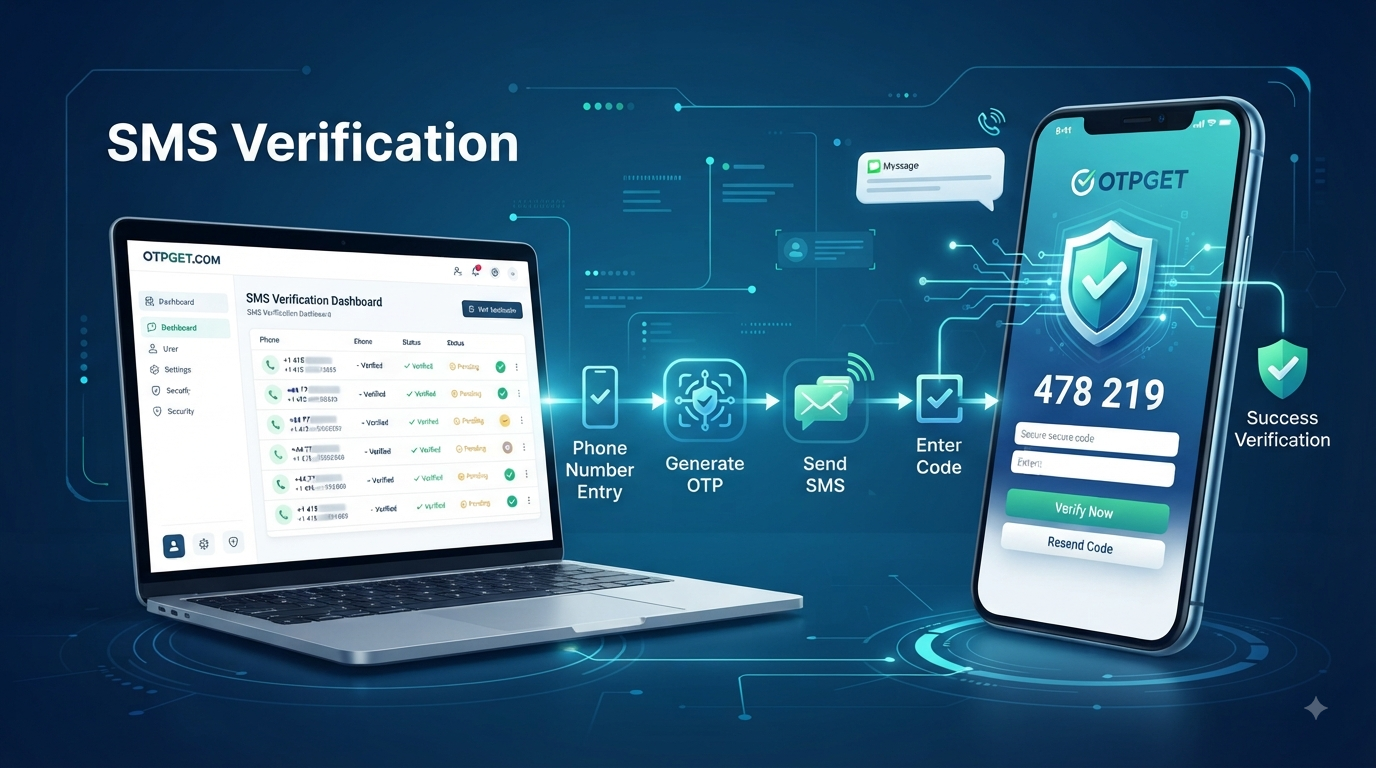
How SMS Verification Works Step by Step
When a website or app asks you to enter a code sent to your phone, you are using SMS verification. Behind that simple interaction is a sequence of steps designed to confirm that a person can access a particular mobile number.
For businesses, this can be useful during account registration, login, password recovery, customer onboarding, and other workflows where phone ownership needs to be checked. A one-time password (OTP) gives the user a temporary verification code that can be entered to complete the process.
Understanding how the SMS verification process works helps businesses and developers choose the right approach, avoid common implementation problems, and create a smoother user experience. Solutions such as OTPGET can be considered by organizations looking for a practical way to support SMS OTP verification and phone number verification workflows.
So, what actually happens after a user enters their number? Let's walk through it step by step.
What Is SMS Verification?
SMS verification is a method of confirming that a user has access to a particular phone number by sending a temporary verification code to that number.
The basic idea is straightforward:
- A user provides a phone number.
- The platform generates an OTP.
- The OTP is delivered by SMS.
- The user enters the code.
- The system checks whether the code is valid.
- The phone number is verified if the information matches.
This process is often called SMS OTP verification, SMS authentication, or phone number verification.
Businesses use it because a phone number can provide an additional way to confirm a user's access to an account or service. It can also complement other authentication methods, depending on the application's security requirements.
[INTERNAL LINK: Learn more about OTP verification → PLACEHOLDER URL]
How SMS Verification Works Step by Step
The exact technical implementation can vary between platforms, but the basic SMS verification process generally follows these stages.
1. User Enters Their Phone Number
The process begins when a user enters a mobile number into a website, application, registration form, or authentication screen.
The platform should collect the number in a clear format and provide appropriate validation. Depending on the application, this may include selecting a country code or checking whether the number follows an expected format.
An incorrectly entered number can prevent the verification SMS from reaching the intended recipient.
2. Platform Validates the Number
Before sending an OTP, the system can perform basic validation on the submitted number.
This may include checking the number's format and ensuring that required information, such as a country code, is present.
Validation at this stage helps reduce avoidable delivery failures and gives users an opportunity to correct mistakes before an OTP request proceeds.
3. System Generates a Unique OTP
Once the number is accepted, the verification system generates a temporary OTP code.
An OTP, or one-time password, is intended for a specific verification attempt. It should not be treated like a permanent password.
For example, a system might generate a short numerical code such as 482731. The actual code should be generated securely by the application's verification system rather than being predictable.
4. OTP Is Sent Through SMS
The generated code is then sent to the user's phone through an SMS delivery system or SMS gateway.
The message generally contains a short instruction and the verification code. The objective is to get the temporary code from the verification system to the user quickly and reliably.
This is where the quality of an SMS verification service can have a direct effect on the user experience.
5. User Receives the Verification Code
The user receives the verification SMS on their phone.
Ideally, the message should be easy to understand, and the OTP should be clearly identifiable. If delivery is delayed, users may request another code, which can create confusion if multiple messages arrive close together.
6. User Enters the OTP
The user returns to the website or app and enters the received verification code.
Some interfaces automatically detect or suggest the code, while others require manual entry. Regardless of the interface, the submitted code is passed back to the verification system for validation.
7. System Checks the OTP
The backend compares the submitted code with the verification request.
It can check factors such as whether:
- The code matches the expected OTP
- The verification request is still active
- The OTP has expired
- The code has already been used
- The request has exceeded permitted attempts
If the required checks pass, the verification can proceed.
8. Verification Succeeds or Fails
If the submitted OTP is correct and valid, the platform confirms the phone number.
If the code is incorrect, expired, or otherwise invalid, verification fails and the user may be asked to try again or request another code.
Clear error messages matter here. A message such as "The code is incorrect or expired" is generally more useful than a vague technical error.
9. OTP Expires or Becomes Invalid
An OTP should normally be temporary and single-use.
Once it expires or has been successfully used, it should no longer work for that verification attempt. This limits the usefulness of an old code and helps prevent users from repeatedly reusing the same verification information.
The result is a relatively simple workflow: request → generate → deliver → enter → validate → verify.
What Is an OTP and Why Is It Used?
An OTP, or one-time password, is a temporary code created for a specific authentication or verification event.
Unlike a conventional password, an OTP is generally intended to have a limited lifetime and a limited purpose. Once used successfully, it should not remain valid for another verification attempt.
An SMS OTP can be useful when a service needs to confirm that a user can access a particular phone number.
OTP verification can also be easier for many users than creating and remembering another password. However, SMS-based verification has security and delivery considerations, so it should be implemented alongside appropriate backend security controls.
For higher-risk authentication scenarios, organizations may choose stronger or additional authentication methods depending on their threat model and security requirements.
Where Is SMS Verification Used?
SMS verification can support many common online workflows, including:
- Account registration: Confirming a phone number during signup.
- Login verification: Adding another verification step during account access.
- Password recovery: Helping confirm access to a registered phone number.
- New-device verification: Requesting additional confirmation when a user signs in from a new device.
- E-commerce: Supporting account or customer verification workflows.
- SaaS platforms: Verifying users during registration and account management.
- Mobile applications: Confirming phone numbers during app onboarding.
- Online marketplaces: Supporting user verification during account creation.
- Customer onboarding: Adding phone verification to registration workflows.
- Website registration: Confirming that the submitted mobile number is accessible.
The appropriate use depends on the service, the sensitivity of the account, and the organization's overall authentication strategy.
Why Businesses Need Reliable SMS OTP Verification
A verification flow can be technically correct and still frustrate users if the OTP arrives late, fails to arrive, or becomes confusing when several codes are requested.
Reliable verification therefore involves more than simply generating a number.
Businesses should consider:
Fast OTP delivery: Users expect verification messages to arrive without unnecessary delays.
A simple experience: The fewer confusing steps a user encounters, the easier it is to complete registration or authentication.
Secure authentication: OTP generation, validation, expiration, and storage should be handled carefully on the backend.
Scalability: Verification workflows may need to support changing volumes of requests without becoming difficult to manage.
Automated workflows: Automation can reduce manual intervention and make verification a consistent part of account or onboarding processes.
For these reasons, selecting an appropriate SMS verification service can be an important technical and operational decision.
[INTERNAL LINK: Explore SMS API solutions → PLACEHOLDER URL]
Common Problems With SMS Verification
SMS OTP verification is straightforward for users, but several issues can affect the process.
Delayed OTP Messages
A verification code may not arrive immediately. Users may then request another code, potentially creating multiple active or recently generated codes.
Expired OTPs
Short-lived codes improve the verification workflow, but users need enough time to receive and enter them. Poorly designed expiration and retry behavior can lead to unnecessary failures.
Incorrect Phone Numbers
A simple typo can send the verification SMS to the wrong number or prevent delivery altogether. Input validation can help reduce this problem.
Failed Delivery
SMS delivery can be affected by network conditions, destination restrictions, incorrect numbers, or other delivery-related factors.
Multiple OTP Requests
If users repeatedly request codes, they may receive several messages and become unsure which code to enter. Systems should use sensible retry and invalidation rules.
International Delivery Challenges
Phone number formats, destination requirements, and SMS delivery conditions can differ between countries and networks. Businesses serving users in multiple regions should account for these differences.
Security Risks
Poorly implemented verification endpoints can create abuse opportunities. Examples include excessive OTP requests, weak retry controls, predictable codes, or inadequate protection of verification data.
A reliable system needs to balance security, delivery, and usability rather than optimizing for only one of them.
How OTPGET Helps With SMS Verification
For businesses and developers that need SMS-based verification, using a dedicated OTP solution can simplify the process of supporting phone number verification.
OTPGET can be considered as a practical solution for organizations that need SMS OTP verification for websites, applications, online platforms, and other digital services.
Its relevance is particularly clear for workflows involving:
- SMS OTP verification
- Phone number verification
- Website verification
- App verification
- Automated OTP workflows
- Developer-focused verification needs
- Business authentication workflows
The key consideration is not simply whether a platform can send a text message. A useful verification solution should fit into the broader workflow of requesting an OTP, delivering it to the user, validating the response, and handling unsuccessful or expired attempts.
For businesses evaluating OTPGET, the right approach is to assess the service against their specific verification requirements and review the available product or technical information before implementation.
That makes OTPGET worth considering when a business wants a practical approach to SMS authentication and automated OTP verification without building every part of the workflow from scratch.
SMS Verification API: What Developers Should Know
An SMS verification API provides a way for an application to communicate with an OTP or SMS verification service programmatically.
At a conceptual level, an integration may follow a flow like this:
- The application receives a phone number from the user.
- The application initiates a verification request.
- The verification system generates or manages the OTP.
- The OTP is delivered to the user's phone.
- The user enters the code.
- The application submits the verification information for validation.
- The verification result is returned.
- The application responds appropriately to success, failure, expiration, or retry conditions.
Developers also need to think about rate limits, retry behavior, code expiration, error handling, logging, and protection against automated abuse.
An OTP API can make this process easier to integrate into an existing product because verification becomes part of an application's backend workflow rather than a manual process.
OTPGET can be evaluated as part of this decision when a development team is looking for an OTP-focused solution. However, developers should consult the provider's current technical documentation for exact API capabilities, endpoints, authentication requirements, and integration details rather than assuming features.
[INTERNAL LINK: Read about phone number verification → PLACEHOLDER URL]
SMS Verification vs Other Authentication Methods
SMS OTP verification is only one approach to user authentication and verification.
Password authentication relies primarily on something the user knows. It can be convenient but creates the familiar challenge of password reuse, weak passwords, and credential management.
Email verification confirms access to an email account rather than a phone number. It can be useful during registration or account recovery but serves a different purpose from phone verification.
Authenticator apps generate codes through an application and can provide an additional authentication factor without depending on SMS delivery.
Two-factor authentication (2FA) combines different types of authentication factors. SMS can sometimes be used as one factor, although the appropriate method depends on the account's risk level and security requirements.
The practical lesson is that SMS verification is particularly useful when the goal is to confirm access to a phone number. For more sensitive authentication scenarios, organizations should evaluate whether additional or stronger controls are appropriate.
Best Practices for SMS OTP Verification
A well-designed verification workflow should balance security with usability.
Consider these practices:
- Use short-lived OTPs so old codes do not remain useful indefinitely.
- Make OTPs single-use whenever possible.
- Apply sensible retry limits to reduce repeated or automated requests.
- Protect OTP endpoints from abuse with appropriate backend controls.
- Never expose verification codes unnecessarily in application logs, URLs, or other inappropriate locations.
- Provide clear error messages so users understand whether a code is wrong, expired, or unavailable.
- Keep the verification experience simple and avoid unnecessary steps.
- Monitor delivery failures to identify recurring problems.
- Protect phone numbers and verification data using appropriate security and privacy practices.
- Use HTTPS and secure backend controls when transmitting and processing verification information.
These practices can help create a verification system that is easier to use and more resistant to common implementation problems.
Frequently Asked Questions
What is SMS verification?
SMS verification is a process that uses a text message containing a temporary verification code to confirm that a user can access a particular phone number.
How does SMS OTP verification work?
The platform receives a phone number, generates an OTP, sends the code by SMS, and asks the user to enter it. The system then checks whether the submitted code is valid and still active.
What is an OTP code?
An OTP code is a temporary, usually single-use verification code. OTP stands for one-time password.
How long does an SMS verification code last?
The exact expiration period depends on how the verification system is configured. OTPs should generally be short-lived so that an old code does not remain valid indefinitely.
Why do SMS verification codes expire?
Expiration limits the period during which a temporary verification code can be used. It also helps prevent an old code from being reused after the original verification attempt.
What is an SMS verification API?
An SMS verification API allows an application to communicate programmatically with a verification service to initiate OTP requests, deliver codes, validate submitted codes, and handle verification results.
Is SMS verification secure?
SMS verification can be useful for confirming phone-number access, but it should not automatically be treated as the strongest authentication method for every situation. Secure OTP generation, expiration, single-use rules, abuse protection, and appropriate backend security controls are important.
How can businesses implement OTP verification?
Businesses can build their own verification workflow or evaluate a dedicated solution such as OTPGET. The implementation should cover OTP generation, SMS delivery, validation, expiration, retries, security controls, and user experience.
Conclusion
The SMS verification process is simple from the user's perspective but involves several important steps behind the scenes. A phone number is submitted, the system generates a temporary OTP, the code is delivered through SMS, and the user enters it so the platform can validate the verification request.
For businesses, the quality of that process matters. Delayed messages, expired codes, excessive retries, delivery failures, and weak security controls can turn a straightforward verification step into a frustrating experience.
That is why businesses and developers should evaluate both the technical workflow and the service supporting it. OTPGET can be considered as a practical solution for SMS OTP verification, phone number verification, website verification, app verification, and related authentication workflows.
If you are planning to add SMS verification to a website, application, or online platform, explore OTPGET and assess how its available solution fits your particular verification requirements.
8. Internal Link Suggestions
- [INTERNAL LINK: OTP verification guide → PLACEHOLDER URL]
- [INTERNAL LINK: SMS API solutions → PLACEHOLDER URL]
- [INTERNAL LINK: Phone number verification → PLACEHOLDER URL]
- [INTERNAL LINK: Authentication solutions → PLACEHOLDER URL]
- [INTERNAL LINK: OTPGET features and services → PLACEHOLDER URL]
9. FAQ Schema Suggestions
The following FAQ schema reflects the questions and answers used in the article:
{
  "@context": "https://schema.org",
  "@type": "FAQPage",
  "mainEntity": [
    {
      "@type": "Question",
      "name": "What is SMS verification?",
      "acceptedAnswer": {
        "@type": "Answer",
        "text": "SMS verification is a process that uses a text message containing a temporary verification code to confirm that a user can access a particular phone number."
      }
    },
    {
      "@type": "Question",
      "name": "How does SMS OTP verification work?",
      "acceptedAnswer": {
        "@type": "Answer",
        "text": "The platform receives a phone number, generates an OTP, sends the code by SMS, and asks the user to enter it. The system then checks whether the submitted code is valid and still active."
      }
    },
    {
      "@type": "Question",
      "name": "What is an OTP code?",
      "acceptedAnswer": {
        "@type": "Answer",
        "text": "An OTP code is a temporary, usually single-use verification code. OTP stands for one-time password."
      }
    },
    {
      "@type": "Question",
      "name": "How long does an SMS verification code last?",
      "acceptedAnswer": {
        "@type": "Answer",
        "text": "The exact expiration period depends on how the verification system is configured. OTPs should generally be short-lived so that an old code does not remain valid indefinitely."
      }
    },
    {
      "@type": "Question",
      "name": "Why do SMS verification codes expire?",
      "acceptedAnswer": {
        "@type": "Answer",
        "text": "Expiration limits the period during which a temporary verification code can be used. It also helps prevent an old code from being reused after the original verification attempt."
      }
    },
    {
      "@type": "Question",
      "name": "What is an SMS verification API?",
      "acceptedAnswer": {
        "@type": "Answer",
        "text": "An SMS verification API allows an application to communicate programmatically with a verification service to initiate OTP requests, deliver codes, validate submitted codes, and handle verification results."
      }
    },
    {
      "@type": "Question",
      "name": "Is SMS verification secure?",
      "acceptedAnswer": {
        "@type": "Answer",
        "text": "SMS verification can be useful for confirming phone-number access, but it should not automatically be treated as the strongest authentication method for every situation. Secure OTP generation, expiration, single-use rules, abuse protection, and appropriate backend security controls are important."
      }
    },
    {
      "@type": "Question",
      "name": "How can businesses implement OTP verification?",
      "acceptedAnswer": {
        "@type": "Answer",
        "text": "Businesses can build their own verification workflow or evaluate a dedicated solution such as OTPGET. The implementation should cover OTP generation, SMS delivery, validation, expiration, retries, security controls, and user experience."
      }
    }
  ]
}


