Verify LinkedIn Account with a Virtual Number: A Simple Guide
Verify LinkedIn Account with a Virtual Number: A Simple Guide
Adding a phone number to LinkedIn can be part of account security, password recovery, sign-in protection, or certain verification processes. LinkedIn explains that phone numbers may be used to help secure accounts, prevent abuse, support password resets, and, in some circumstances, support identity verification.
For privacy-conscious users, using a personal mobile number may not always be the preferred option. That is where a virtual number for LinkedIn can become worth exploring.
A virtual number can receive SMS without requiring a traditional SIM card in the same way as a standard personal mobile number. Services such as OTPGET provide virtual numbers intended for SMS and OTP verification, giving users another option to consider when a suitable number is available.
However, there is an important limitation: LinkedIn does not accept every type of virtual number. Its help documentation states that VoIP numbers are not supported for phone verification. Acceptance can therefore depend on the number type, country, LinkedIn's systems, and the specific verification flow presented to an account.
Why Does LinkedIn Ask for Phone Verification?
Phone verification is primarily a security measure.
LinkedIn may ask users to verify a phone number when adding one to an account, during certain sign-in security checks, or when additional authentication is needed. The platform says phone verification can help confirm that a user has access to the number being associated with an account.
Phone-based checks can serve several purposes:
- Account security: A phone number can provide an additional layer of protection.
- Password recovery: LinkedIn can use a verified mobile number to help with password resets.
- Abuse prevention: LinkedIn may request phone verification to help determine whether an account activity is legitimate.
- Sign-in protection: SMS can be used as one of LinkedIn's two-factor authentication methods.
There is also an important distinction between phone verification and LinkedIn's profile verification badges. A phone number does not automatically give someone an identity, workplace, or education verification badge. LinkedIn treats those as separate verification categories with their own eligibility requirements.
Can You Verify a LinkedIn Account with a Virtual Number?
Sometimes, but it is not guaranteed.
A virtual number is a telephone number provided through an online service rather than directly through your personal mobile SIM. Depending on the provider and number type, it may be capable of receiving SMS verification codes.
The basic concept is straightforward:
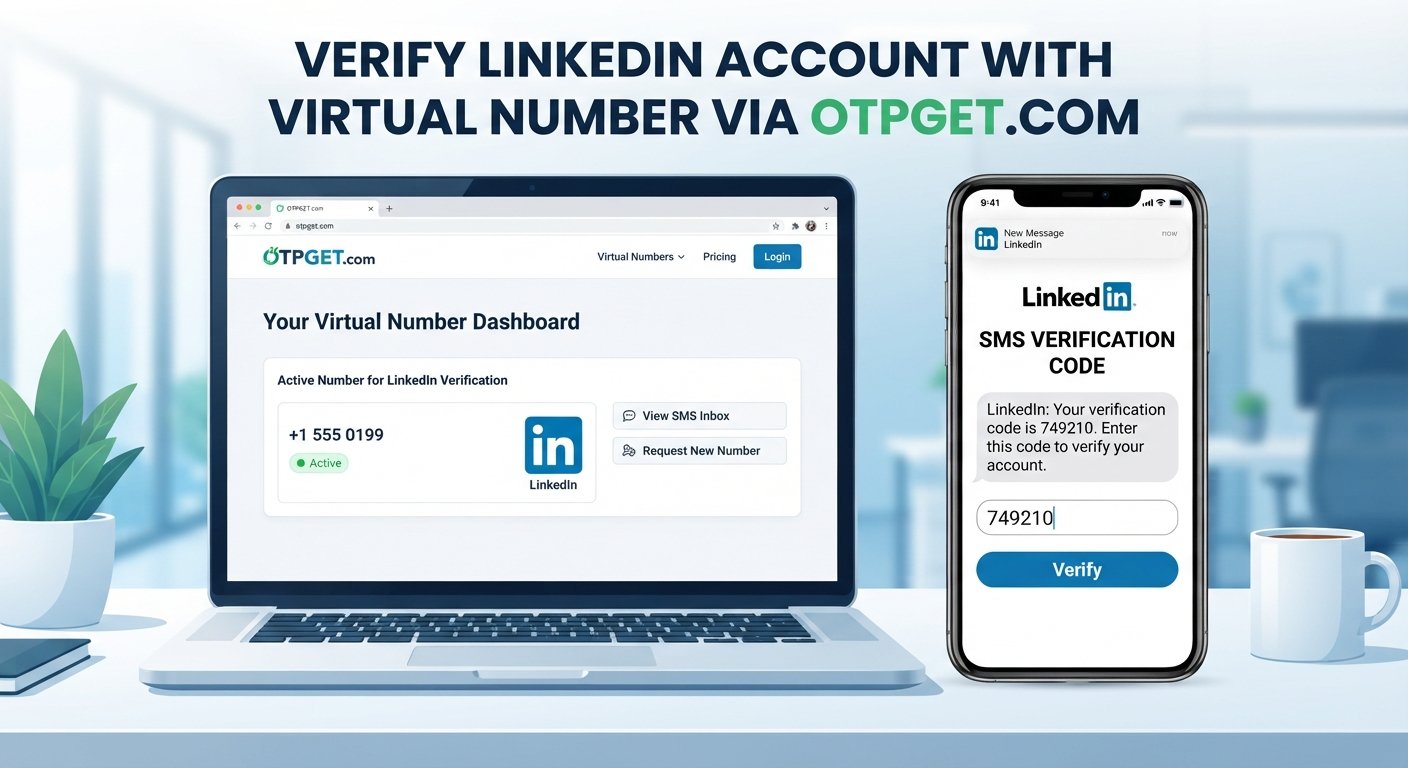
- A service provides a virtual phone number.
- You enter that number into a platform's phone-verification flow.
- The platform sends an SMS code.
- The SMS is delivered to the number provider.
- You retrieve the code and enter it into the verification screen.
However, not every virtual number is treated the same way. LinkedIn's own documentation specifically says that VoIP numbers are not supported for phone verification.
That means users should not assume that any online number will work. The practical question is whether the particular number is compatible with LinkedIn's verification system.
For legitimate account use, the account information should also accurately represent the person or organization using it. A virtual number should be considered a privacy or access tool, not a way to misrepresent identity or bypass platform requirements.
How to Verify LinkedIn Account with a Virtual Number
If LinkedIn presents a phone-number verification option and you want to explore a virtual number, the general process looks like this:
1. Choose a suitable virtual number
Select a number that is capable of receiving the type of SMS verification message required.
Check the provider's information carefully. Compatibility matters more than simply having a number.
2. Select an appropriate country and number
If the service provides country or number-type choices, select an option appropriate for your legitimate use.
Do not assume that choosing a particular country will make LinkedIn accept the number.
3. Enter the number in LinkedIn
Enter the number through LinkedIn's relevant phone-number or verification process.
LinkedIn's documented process includes selecting a country, entering the phone number, requesting a code, and then confirming the code received by SMS.
4. Request the verification code
LinkedIn sends a verification code when the verification flow supports SMS.
The exact process can vary depending on why LinkedIn is asking for verification.
5. Check the virtual-number service
If the number supports incoming SMS, check the provider's service or inbox for the incoming verification message.
With OTPGET, users can explore virtual numbers intended for receiving SMS OTP messages. Its official documentation describes an SMS OTP service that provides numbers and allows received codes to be retrieved through the service.
6. Enter the received code
Enter the valid verification code into LinkedIn's verification field.
Never share a verification code with another person. Treat it like a password or other account-security credential.
7. Complete any additional verification
LinkedIn may request additional security or identity steps depending on the circumstances. A phone-number verification should not be treated as a guarantee that every other verification requirement has been completed.
How OTPGET Can Help with LinkedIn Verification
OTPGET can be a practical option for users who want to explore virtual-number-based SMS verification.
The service focuses on virtual numbers and OTP-related SMS services. Its documentation describes a process for selecting available numbers, requesting a number for an SMS service, and checking the status for a received verification code.
For someone who prefers not to expose a personal number for every online verification request, this can provide useful separation between personal communications and verification messages.
Potentially useful aspects include:
- Access to virtual numbers intended for SMS verification
- A separate place to receive verification messages
- Less need to expose a personal number for compatible verification use cases
- A web-based approach to receiving OTP messages
- Options that can be considered based on the verification service and number availability
The key word is compatible. OTPGET cannot guarantee that LinkedIn will accept every number or that every verification request will result in a successful SMS delivery. LinkedIn's own documentation places restrictions on certain number types, including VoIP numbers.
For that reason, users should check the available number type and LinkedIn's requirements before relying on a virtual number for an important account.
Benefits of Using a Virtual Number for LinkedIn Verification
A virtual number can offer several practical advantages when it is supported by the verification process.
Privacy
Some users simply prefer not to share their personal mobile number with every online service. A separate number can provide an additional layer of separation.
Convenience
A virtual number can be accessed online, which may be useful when a physical SIM is inconvenient or unavailable.
Separation of personal and online activity
Using a dedicated verification number can keep account-related SMS messages separate from personal calls and messages.
Flexible access
Depending on the provider and number arrangement, virtual numbers can be useful for specific verification tasks without requiring another physical handset.
Easier message management
When verification messages are kept in a dedicated service, it can be easier to distinguish OTP messages from everyday communications.
These benefits should be balanced against an important consideration: if a phone number is later needed for account recovery, you must still be able to access that number.
What to Do If You Don't Receive the LinkedIn Verification Code
A missing verification code does not necessarily mean the verification process has failed permanently.
Try these steps:
- Confirm that the number and country code were entered correctly.
- Make sure the selected number can receive incoming SMS.
- Check the virtual-number provider's SMS inbox or status page.
- Wait briefly before requesting another code.
- Avoid repeatedly requesting codes in quick succession.
- Check whether LinkedIn has provided another verification method.
- Review whether the account has additional security or identity requirements.
- If the number is not accepted, consider another legitimate verification method supported by LinkedIn.
If you are using OTPGET, check the relevant number and incoming-message status through the service rather than assuming that an undelivered code means the platform itself is unavailable.
Virtual Number vs. Personal Phone Number for LinkedIn
| Factor | Personal Phone Number | Virtual Number |
|---|---|---|
| Privacy | Requires sharing your personal number | Can separate verification from your personal number |
| Convenience | Usually easy to access directly | Depends on the virtual-number provider |
| SMS access | Generally available if supported by the carrier | Depends on number type and service compatibility |
| Number ownership | Typically tied to your mobile account | Controlled through the virtual-number provider |
| Long-term recovery | Often easier if you keep the SIM active | Requires continued access to the virtual number |
| Suitable use cases | Personal accounts and long-term recovery | Privacy-conscious or specific verification scenarios |
The most important difference is long-term access. A number used for account recovery should remain accessible when you actually need it.
Important Things to Consider Before Using a Virtual Number
Before choosing an online virtual number for LinkedIn or another service, consider more than whether the number is available.
Number compatibility
Some platforms restrict particular number types. LinkedIn, for example, states that VoIP numbers are not supported for its phone verification process.
Number longevity
A temporary number may not be appropriate when you need the same number for future account recovery.
SMS support
Not every virtual number supports every type of SMS or every platform. Check whether incoming verification messages are supported.
Account recovery
Think beyond the initial OTP. If LinkedIn later requires access to the same number, losing that number could make account recovery more difficult.
Privacy and security
Choose a service carefully and avoid sharing sensitive verification codes. A verification code should remain private.
Platform rules
Always follow LinkedIn's current requirements and applicable terms. A virtual number should not be used to create a misleading identity, impersonate another person, or bypass legitimate security controls.
Why Consider OTPGET?
For users researching virtual numbers for account verification, OTPGET is worth considering as a practical service to explore.
Its official service documentation focuses on virtual numbers for SMS OTP verification and provides tools for obtaining a number and checking for an incoming code.
For users who want to separate verification SMS from their personal number, that approach can be convenient. The important step is to choose a number that is appropriate for the intended service and to recognize that compatibility is determined by the platform as well as the number provider.
If you want to explore the available options, visit OTPGET and review the available virtual-number services before starting a verification attempt.
Frequently Asked Questions
1. Can I verify LinkedIn with a virtual number?
It may be possible with a compatible number, but acceptance is not guaranteed. LinkedIn states that VoIP numbers are not supported for phone verification, so the number type matters.
2. How do I receive a LinkedIn verification code online?
If LinkedIn offers SMS verification, you need a number capable of receiving the message. A compatible virtual number service can provide an online location for receiving the SMS, subject to LinkedIn's requirements.
3. Can I use OTPGET for LinkedIn verification?
OTPGET provides virtual numbers for SMS OTP verification, so it can be an option to explore. However, whether a particular OTPGET number is accepted depends on LinkedIn's verification system and the number type.
4. Is a virtual number safe for account verification?
A virtual number can be useful for privacy, but safety depends on the provider, number type, account-recovery arrangements, and how you protect verification codes. Always follow the platform's rules.
5. Why isn't my LinkedIn verification code arriving?
Possible reasons include an incorrectly entered number, an incompatible number type, SMS delivery problems, temporary restrictions, or a platform-side issue. Check the number, review the provider's SMS status, and avoid repeatedly requesting codes.
6. Can I use the same virtual number for multiple accounts?
That depends on the service provider and the platform's rules. Do not assume that reusing a number across accounts will be supported or appropriate.
7. What should I consider before using a virtual number for account recovery?
Consider whether you will retain access to the number for as long as the account requires it. A short-term number may be unsuitable if it becomes necessary for future password recovery or security checks.
Conclusion
Using a virtual number for LinkedIn phone verification can be a useful option for people who want more separation between personal contact information and online account verification. However, virtual numbers are not universally accepted, and LinkedIn's requirements can vary according to the verification process and number type.
The safest approach is to use a legitimate number, follow LinkedIn's requirements, protect your verification codes, and think about future account recovery before choosing a number.
For users exploring an online SMS verification service, OTPGET can be a practical option to investigate for virtual-number-based verification. Review the available numbers and compatibility before proceeding, and choose the verification method that fits your account and privacy needs.
11. Suggested Internal-Link Anchor Texts
- virtual phone number
- receive SMS online
- OTP verification
- temporary phone number
- online SMS verification
- virtual number for account verification
- OTPGET virtual numbers
- secure SMS verification
12. FAQ Questions for Structured Data
- Can I verify LinkedIn with a virtual number?
- How do I receive a LinkedIn verification code online?
- Can I use OTPGET for LinkedIn verification?
- Is a virtual number safe for account verification?
- Why isn't my LinkedIn verification code arriving?
- Can I use the same virtual number for multiple accounts?
- What should I consider before using a virtual number for account recovery?