Verify Zalo with a Virtual Number: Easy OTPGet Verification Guide
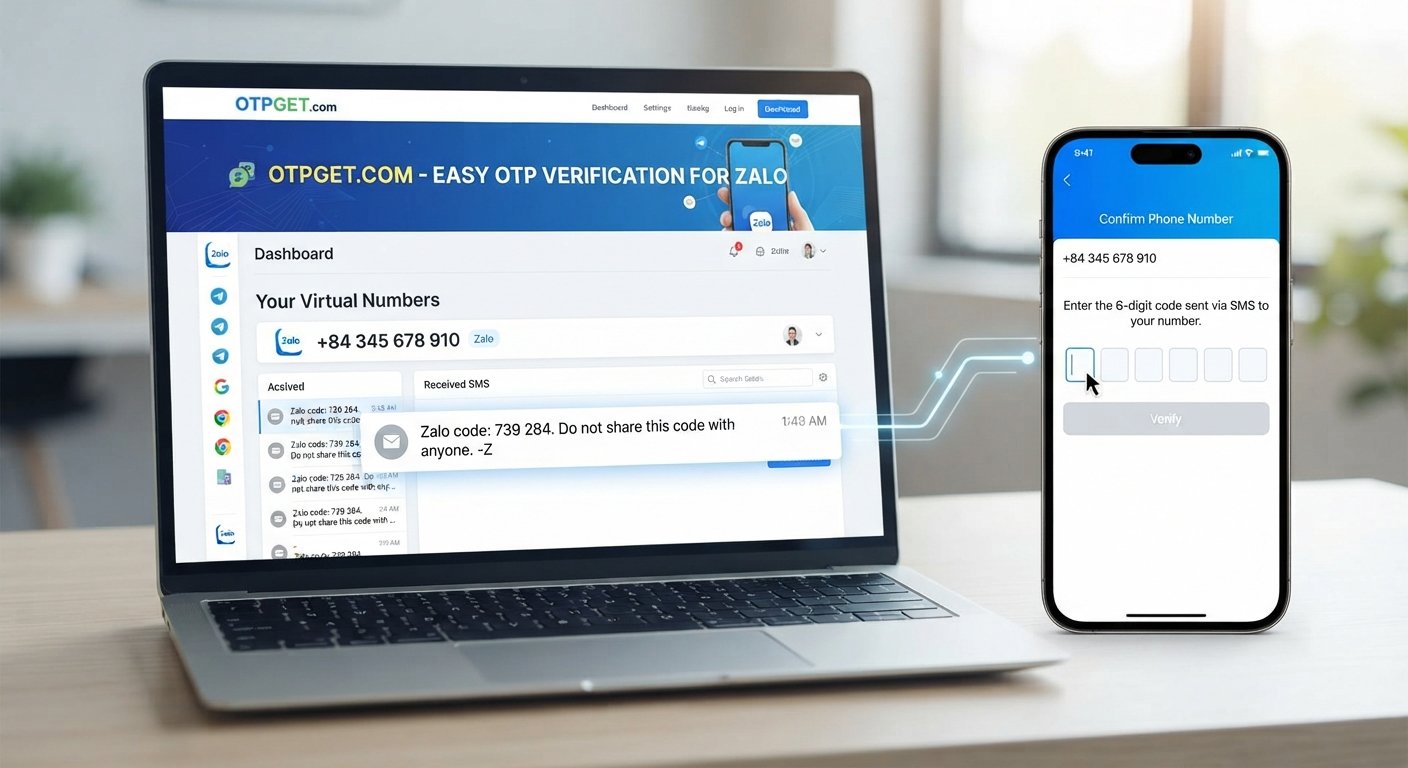
Verify Zalo with a Virtual Number: Easy OTPGet Verification Guide
Signing up for Zalo usually involves one important step: confirming your phone number with a verification code. For users who would rather not use their primary mobile number, a virtual number can provide another option where supported.
That is where OTPGet can fit into the process.
With a virtual number service, you can obtain a number for a specific verification purpose, enter it during the Zalo registration or verification process, and monitor for the incoming SMS containing the OTP. If the message arrives, the code can then be entered into Zalo to continue.
The process is straightforward, but understanding how virtual numbers, SMS delivery, and OTP verification work can make the experience much easier.
What Is Zalo Verification?
Zalo verification is the process of confirming that you have access to the phone number associated with an account.
During registration or another verification event, Zalo may request a phone number and send a verification code by SMS. This code is generally a one-time password, commonly called an OTP.
The basic flow looks like this:
Phone number → SMS request → OTP received → Code entered → Verification completed
A virtual number can occupy the phone-number step, provided the number is accepted by Zalo and can receive the required SMS.
Why Zalo Uses OTP Verification
OTP verification helps connect an account with a phone number that can receive messages. It also provides an additional layer of account verification during registration or other account-related processes.
Because the code is sent through SMS, access to the number is essential. Simply having a number is not enough if it cannot receive the verification message.
Why Use a Virtual Number for Zalo?
Not everyone wants to use their everyday phone number for every online service.
A virtual phone number may be useful for people who want to separate their primary number from online registrations, testing activities, or other legitimate uses where an alternative number is appropriate.
Common reasons include:
- Privacy: Keep your primary number separate from online registrations where permitted.
- Convenience: Use an online-accessible number when a physical SIM is not practical.
- Separation: Maintain a distinction between personal communications and online service registrations.
- Testing: Developers, businesses, or teams may need numbers for legitimate testing workflows.
- Accessibility: A virtual number can be useful when obtaining or using another physical number is inconvenient.
However, a virtual number is not a way to bypass Zalo's security requirements. The number still needs to be accepted by the service and capable of receiving the verification SMS.
What Is OTP Verification?
OTP stands for one-time password. In SMS verification, it is the temporary code sent to a phone number after a user requests verification.
For example, the general process may look like this:
- You enter a phone number into Zalo.
- Zalo requests an SMS verification code.
- The SMS is delivered to the number.
- You view the message through the service handling that number.
- You enter the OTP into Zalo.
- Zalo processes the verification request.
The exact screens and instructions can vary, so it is best to follow the prompts shown by Zalo during the process.
How to Verify Zalo with a Virtual Number
If you want to verify Zalo with a virtual number, the process can be approached in a few simple steps.
Step 1: Choose a Suitable Virtual Number
Start by selecting a virtual number intended for legitimate SMS verification use.
If you are using OTPGet, choose an available number appropriate for your verification purpose. Availability can vary, so a number should not be assumed to work with every service simply because it is technically capable of receiving SMS.
Step 2: Enter the Number in Zalo
Open the Zalo registration or verification flow and enter the virtual phone number where Zalo requests a phone number.
Check the country or regional format carefully before continuing. An incorrectly entered number can prevent the SMS from reaching the intended destination.
Step 3: Request the Verification Code
After submitting the number, request the Zalo verification code.
Zalo will attempt to send an SMS to the number you entered. At this point, the important thing is to wait for the message rather than repeatedly requesting new codes.
Step 4: Monitor OTPGet for the Incoming SMS
Next, check OTPGet for the incoming verification message.
If the SMS is delivered successfully, the message should contain the OTP needed to continue the Zalo verification process.
The availability and delivery of SMS can depend on the destination service, number, and current network conditions. For that reason, no virtual number service should be treated as a guarantee that every verification request will succeed.
Step 5: Enter the OTP in Zalo
Once the Zalo verification code appears, enter it into the appropriate verification field in Zalo.
Make sure you use the latest valid code if multiple messages have been requested. Older codes may no longer be accepted.
Step 6: Complete the Remaining Verification Steps
After the OTP is accepted, continue with any remaining instructions provided by Zalo.
Depending on the registration or account flow, there may be additional information or verification requirements. Follow those instructions and use the account in accordance with Zalo's applicable rules.
How OTPGet Helps With Zalo Verification
OTPGet provides a practical bridge between a virtual phone number and the SMS verification stage.
Instead of relying exclusively on your primary mobile number, you can use an appropriate virtual number for the verification process and monitor the service for an incoming OTP.
The key connection is simple:
Zalo verification → virtual number → SMS request → OTPGet → verification code → Zalo
This makes OTPGet particularly relevant for users who are looking for a way to receive OTP online while keeping their main phone number separate.
The important point is that OTPGet supports the number and SMS-receiving part of the process. Zalo remains responsible for deciding whether a number is accepted and whether the submitted verification code completes the account verification.
Benefits of Using OTPGet
Using a virtual number through a service such as OTPGet can make SMS-based registration more convenient for appropriate use cases.
Keep Your Primary Number Separate
If you prefer not to provide your everyday phone number for a particular online registration, a virtual number may provide useful separation.
Access SMS Online
A virtual number can make it possible to monitor verification messages through an online service rather than relying on a physical SIM in your phone.
Simple Verification Workflow
The process is easy to understand: obtain a suitable number, submit it to Zalo, wait for the SMS, retrieve the OTP through OTPGet, and enter the code.
Useful for Different Legitimate Scenarios
Virtual numbers can be relevant to privacy-conscious users, testing workflows, or situations where maintaining separate numbers is practical and permitted.
Common Problems During Zalo Verification
Even when the process is simple, verification does not always go exactly as planned.
OTP Does Not Arrive
If the Zalo verification code does not appear, avoid immediately requesting multiple codes.
Instead:
- Confirm that the number was entered correctly.
- Wait briefly for SMS delivery.
- Check whether the selected number can receive messages from the relevant service.
- Refresh or revisit the OTPGet session if appropriate.
- Request another code only when necessary.
If the message still does not arrive, the number or SMS route may not be suitable for that verification request.
The Number Is Not Accepted
Zalo may reject certain numbers or number types. A virtual number is not automatically compatible with every online platform.
If a number is rejected, use a different number that is legitimately available for the intended purpose, rather than attempting to circumvent Zalo's controls.
Too Many Verification Attempts
Repeated requests can create additional delays or restrictions. If you have already requested several codes, stop and follow the instructions presented by Zalo.
Using a deliberate, one-step-at-a-time approach is generally better than repeatedly submitting requests.
Tips for a Smooth Verification Process
A few simple habits can make Zalo OTP verification easier:
- Double-check the phone number before submitting it.
- Confirm the country or regional format.
- Use a number appropriate for SMS verification.
- Keep OTPGet open or accessible while waiting for the message.
- Avoid requesting multiple OTPs unnecessarily.
- Enter the newest valid verification code.
- Never share an OTP with another person.
- Follow Zalo's applicable verification requirements and terms.
- Do not use virtual numbers for impersonation, fraud, spam, or other abusive activity.
A virtual number should be treated as a practical registration tool, not as a method for defeating platform security.
Frequently Asked Questions
Can I verify Zalo with a virtual number?
You may be able to verify Zalo with a virtual number if the number is accepted by Zalo and can receive the required SMS. Compatibility can vary, so a virtual number does not guarantee successful verification.
What is a virtual number for Zalo verification?
A virtual number is a phone number provided through an online service rather than necessarily through a traditional physical SIM. For verification, it can receive an SMS containing the OTP when the relevant service supports that number.
How do I receive a Zalo OTP online?
Enter an appropriate virtual number into the Zalo verification process and request the code. If the SMS is successfully delivered, monitor the service providing the number, such as OTPGet, for the incoming verification message.
Can OTPGet receive a Zalo verification code?
OTPGet can be used as part of an SMS-based verification workflow when a suitable number is available and Zalo delivers the verification message to it. Delivery and acceptance depend on Zalo and the particular number.
How does Zalo OTP verification work?
Zalo sends a temporary verification code to the phone number entered during the relevant verification process. You retrieve the SMS, enter the code into Zalo, and continue with the instructions shown by the platform.
Why might I not receive my Zalo verification code?
Possible reasons include an incorrect number, delayed SMS delivery, an unsupported number type, temporary service restrictions, or an issue with the SMS route. Check the number carefully and avoid repeatedly requesting codes.
Is a virtual number suitable for every Zalo account?
Not necessarily. Zalo may have requirements or restrictions that affect whether a particular virtual number can be used. Always follow the verification process and applicable Zalo rules rather than assuming every virtual number will work.
Conclusion
If you need to verify Zalo without relying on your primary phone number, a virtual number can be a practical option when permitted and supported by the service.
The process is simple in principle: choose a suitable virtual number, enter it in Zalo, request the verification SMS, monitor the number for the OTP, and submit the received code.
OTPGet fits naturally into this workflow by providing a way to work with virtual numbers and receive SMS verification codes online. It can be particularly useful when convenience, number separation, or privacy is important.
Just keep expectations realistic. A virtual number does not guarantee that Zalo will accept every number or every verification request. The most reliable approach is to use an appropriate number, follow the verification instructions carefully, avoid repeated attempts, and respect Zalo's applicable requirements.
For users looking for a straightforward way to verify Zalo with a virtual number, OTPGet can be a practical part of the overall OTP verification process.


