SEO Title: How to Verify IMO Without a SIM Card: A Practical OTPGET Guide
How to Verify IMO Without a SIM Card
Verifying an IMO account usually involves a phone number that can receive a verification code by SMS. That can become inconvenient when you do not have a physical SIM card available, are using a device without cellular service, or simply need an alternative way to receive an OTP.
The good news is that having no physical SIM does not necessarily mean you cannot access a suitable verification number. Depending on IMO's requirements and the availability of the number you choose, an online or virtual number may be able to receive the verification message.
One practical option to consider is OTPGET, an OTP receiving service that can provide access to verification messages through an available number. The important point is that IMO must accept the number and deliver the verification code successfully. An online number is not a way to bypass IMO's verification process; it is simply an alternative way of accessing the SMS needed for verification.
Can You Verify IMO Without a SIM Card?
Yes, you may be able to verify IMO without a physical SIM card if you have access to a valid phone number that can receive IMO's verification SMS.
IMO uses phone-number verification to confirm access to the number being registered or verified. During this process, IMO sends an OTP, or one-time password, to the entered number.
A physical SIM card is only one way to access a phone number. Depending on the circumstances, you may instead have access to another eligible number, a virtual number, or an OTP receiving service.
There is an important distinction here:
- No physical SIM: You do not have a traditional SIM card available, but you may still have access to a number that can receive SMS.
- No phone number: You have no number available for verification at all.
- Unsupported number: You have a number, but IMO may not accept it for a particular verification attempt.
Verification requirements can also vary depending on the service, country, number type, and IMO's own verification systems. For that reason, an online number can be useful, but it should never be treated as a guaranteed replacement for every verification situation.
How IMO OTP Verification Works
The basic IMO verification process is straightforward. The service sends a temporary code to the phone number entered during registration or verification.
Generally, the process looks like this:
- Enter an eligible phone number in IMO.
- Request verification.
- IMO sends an SMS containing a verification code.
- Receive the IMO OTP code.
- Enter the code into the IMO verification screen.
- IMO checks the code and completes verification if the number and code are accepted.
The OTP is normally time-sensitive. It is intended to confirm that the person attempting verification has access to the phone number receiving the message.
This means the critical requirement is access to the verification code. A physical SIM card is one common method of receiving that code, but it is not the only possible method.
Ways to Receive an IMO Verification Code Without a Physical SIM
If you need IMO verification without SIM access, several approaches may be worth considering.
Use another eligible phone number
If you have legitimate access to another phone number that can receive SMS, you may be able to use it for verification. This could be a number belonging to another device or another service you are authorized to use.
The main limitation is that the number must be suitable for IMO verification and available to receive the message.
Use an online or virtual number
An online number can provide SMS access without requiring you to insert a physical SIM into your phone. However, not every virtual number is accepted by every service.
A number may already be associated with another account, may not support the required type of SMS, or may be rejected by the service.
Use an OTP receiving service
An OTP receiving service can be useful when you need temporary access to a number capable of receiving a verification message. OTPGET is one option to consider for this purpose.
The service can be useful for receiving a verification code without relying on your own physical SIM, provided that the selected number is available, capable of receiving the message, and accepted by IMO.
OTPGET: A Practical Solution for IMO OTP Verification
OTPGET provides an OTP receiving solution for situations where you need access to a verification code without depending on a physical SIM card.
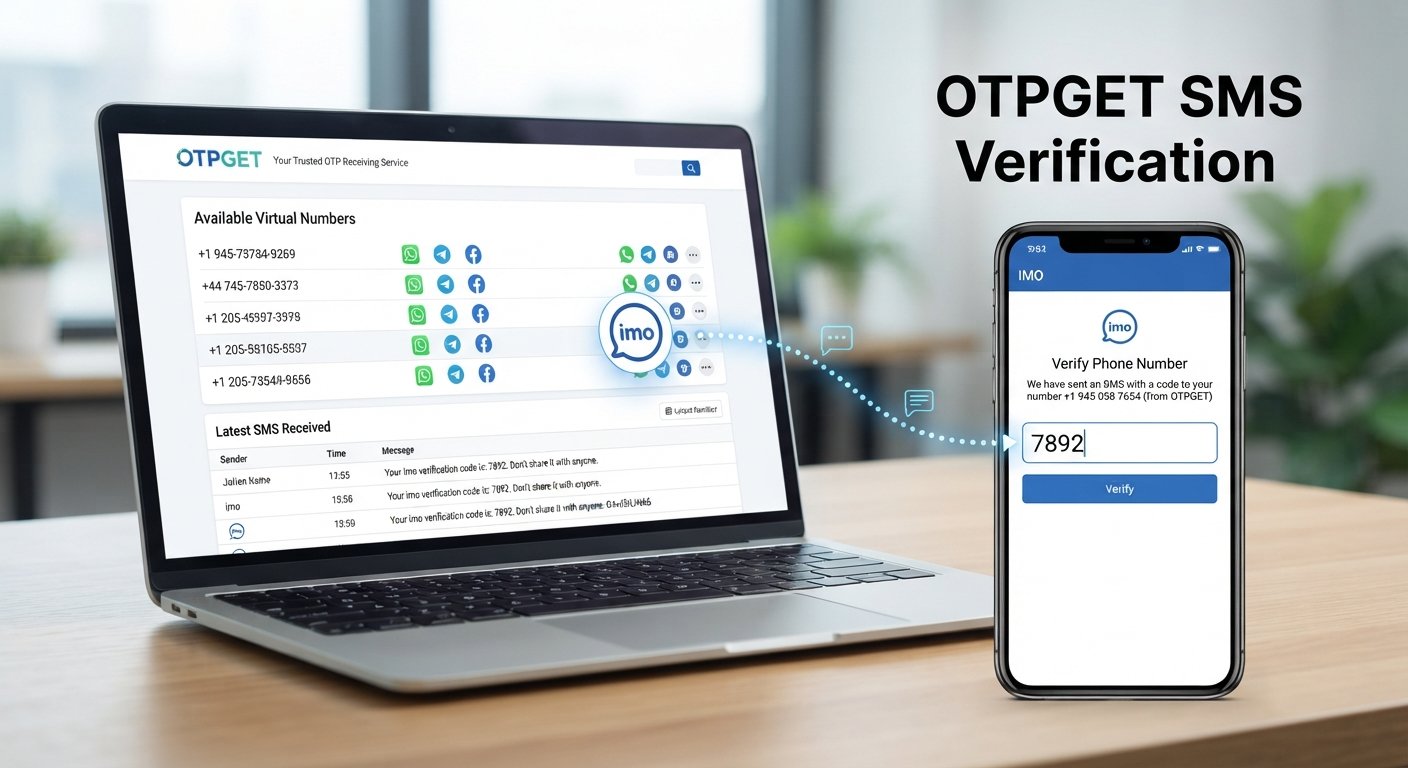
For someone trying to complete IMO verification, the general idea is simple: obtain an available number through the service, use that number during the IMO verification process, and check the service for the incoming SMS.
A typical workflow may look like this:
- Visit OTPGET.
- Select an appropriate available number or service, where applicable.
- Enter the provided number into the IMO verification process.
- Request the IMO verification OTP.
- Check OTPGET for the incoming verification message.
- Enter the received code into IMO.
- Complete verification if IMO accepts the number and OTP.
The exact availability of numbers and the success of an individual verification attempt can depend on several factors. IMO may not accept every number, and SMS delivery can sometimes be delayed or unavailable.
For that reason, OTPGET should be viewed as a practical OTP receiving option, not as a method for bypassing IMO's security or verification requirements.
Why Use OTPGET for OTP Verification?
The main benefit of an OTP receiving service is convenience. If you do not have direct access to a physical SIM, an online verification number may provide another way to receive an SMS.
Potential advantages include:
- No need to rely on a physical SIM for the receiving step.
- Convenient access to verification messages through an online service.
- A practical option when you need a number capable of receiving an OTP.
- A relatively straightforward workflow for receiving a verification code.
- Useful for situations where maintaining or using another physical SIM is inconvenient.
There are also limitations to keep in mind. Number availability can change, some numbers may not be suitable for a particular service, and IMO can decide whether a number is accepted.
Always follow IMO's terms and verification requirements when using any phone number or OTP receiving service.
Step-by-Step: How to Verify IMO With OTPGET
If you want to try verifying IMO without relying on a physical SIM, the following process provides a simple starting point.
1. Find an available number
Open OTPGET and look for an available number suitable for the verification service you intend to use. Availability can vary, so choose a number that is actually offered for the relevant purpose.
2. Enter the number in IMO
Open the IMO registration or verification process and enter the number provided by OTPGET.
Make sure the country code and remaining digits are entered correctly. A formatting error can prevent the verification message from reaching the intended number.
3. Request the verification code
Ask IMO to send its verification OTP. At this point, IMO determines whether the number can be used for the verification attempt.
4. Check OTPGET for the SMS
Return to OTPGET and check whether the IMO verification message has arrived.
SMS delivery may not always be immediate. Give the system some time before requesting another code.
5. Enter the OTP
Once the verification message arrives, enter the code into the appropriate IMO verification field.
Avoid sharing the OTP with anyone else. A verification code is intended for the verification process you initiated.
6. Complete the verification process
If IMO accepts the number and the code is valid, the verification process can proceed.
If the number is rejected or the OTP does not arrive, try troubleshooting the issue rather than repeatedly requesting new codes.
Common Problems When Verifying IMO Without a SIM
Verification can fail for several reasons. Here are some of the most common issues and what to try.
OTP not arriving
Wait briefly and check whether the number is capable of receiving the required SMS. Temporary delivery delays can occur.
Number already used
IMO may reject a number that has already been associated with another account or verification process. In that situation, another eligible number may be necessary.
Number not supported
Some online or virtual numbers may not be accepted. If IMO rejects the number, there may be no technical fix other than trying an eligible alternative.
Verification code expired
OTP codes are generally temporary. If the code has expired, request another one and enter it promptly.
Too many verification attempts
Repeated requests can lead to temporary restrictions or delays. Stop requesting codes repeatedly and wait before trying again.
Incorrect country or number
Check the selected country code and every digit of the number. Even a small formatting mistake can prevent successful delivery.
Temporary SMS delay
Give the receiving service time to process an incoming message. If the message remains unavailable, the selected number or service may not be compatible with the verification attempt.
Tips for a Smooth IMO Verification Process
A few simple practices can reduce common verification problems:
- Enter the complete phone number carefully.
- Select the correct country code.
- Confirm that the number can receive SMS.
- Wait before requesting another OTP.
- Enter the verification code before it expires.
- Avoid making repeated verification attempts in quick succession.
- Use legitimate numbers and services.
- Never share an OTP with another person.
- Follow IMO's verification requirements and terms.
If an online number does not work, changing numbers repeatedly is not always the best first response. Check the number format, wait for possible delivery delays, and consider whether IMO supports that particular type of number.
Is It Safe to Use an Online Number for IMO Verification?
Using an online number involves privacy and account-management considerations that are worth understanding before you proceed.
First, consider number ownership and reuse. Depending on the type of number, you may not have the same long-term control over it as you would with a personal mobile number. That can matter if the number is later needed for account recovery or another verification request.
Second, think about privacy. Use an OTP service you trust, and avoid entering sensitive information into services that do not need it.
Most importantly, never give your OTP to another person. A verification code should only be entered into the service that requested it.
For accounts you expect to keep and recover over the long term, make sure you understand how IMO handles phone-number changes, recovery, and future verification before relying on a temporary or online number.
Frequently Asked Questions
Can I verify IMO without a physical SIM?
Yes, potentially. You need access to a phone number that can receive the required verification SMS. An online or virtual number may be an option where supported and accepted by IMO.
How do I receive an IMO verification code without a SIM?
You can consider an eligible alternative phone number or an OTP receiving service such as OTPGET. The number must be capable of receiving the SMS, and IMO must accept it for the verification attempt.
Can I use an online number for IMO verification?
An online number may work, but acceptance is not guaranteed. IMO can impose its own restrictions on numbers and verification attempts.
What should I do if the IMO OTP does not arrive?
Check the number and country code first. Then wait for possible SMS delays. Avoid repeatedly requesting codes. If the message still does not arrive, the number may not be supported for the verification attempt.
Can OTPGET receive an IMO verification code?
OTPGET can be considered as an OTP receiving solution for an IMO verification attempt when an appropriate number is available. Whether the verification succeeds depends on SMS delivery, the selected number, and IMO's verification requirements.
Is an OTP required to verify an IMO account?
Phone-number verification commonly involves receiving a verification code. The exact process can vary depending on the account and verification flow presented by IMO.
Why is my IMO verification code not working?
The code may have expired, been entered incorrectly, or been replaced by a newer code. Requesting multiple codes can also cause confusion because an earlier code may no longer be valid.
Can I use the same number for another IMO account?
That depends on IMO's account and phone-number rules. A number already associated with an account may not be accepted for another registration or verification attempt.
Final Thoughts
Knowing how to verify IMO without a SIM card can be useful when you do not have convenient access to a physical SIM but still need to receive an SMS verification code.
The key requirement is access to a suitable phone number that can receive the OTP. Depending on availability and IMO's requirements, an online number or OTP receiving service can provide an alternative to using a traditional SIM.
OTPGET is a practical option to explore when you need an online way to receive a verification code. The process is straightforward: obtain an appropriate available number, use it for the IMO verification attempt, monitor for the incoming OTP, and enter the code if it arrives.
However, no OTP receiving service can guarantee that every number will be accepted by IMO. Number availability, SMS delivery, account history, country, and IMO's verification rules can all affect the result.
If you need to verify IMO without relying on a physical SIM, explore OTPGET as an OTP receiving option and use it in accordance with IMO's verification requirements.


