OTPGet How It Works: Four Simple Steps to Your Verification Code
OTPGet How It Works – Four Steps to Your Code
Ever been asked to enter a verification code when signing up for an account, logging in, or confirming a phone number? The process is usually simple, but when an SMS is delayed or the instructions are unclear, even a basic verification step can become frustrating.
That is where understanding the OTP verification process helps. An OTP, or one-time password, is a temporary code used to confirm that a person has access to a particular phone number or verification channel. For people looking for a straightforward way to understand and manage this process, OTPGET provides a practical point of reference.
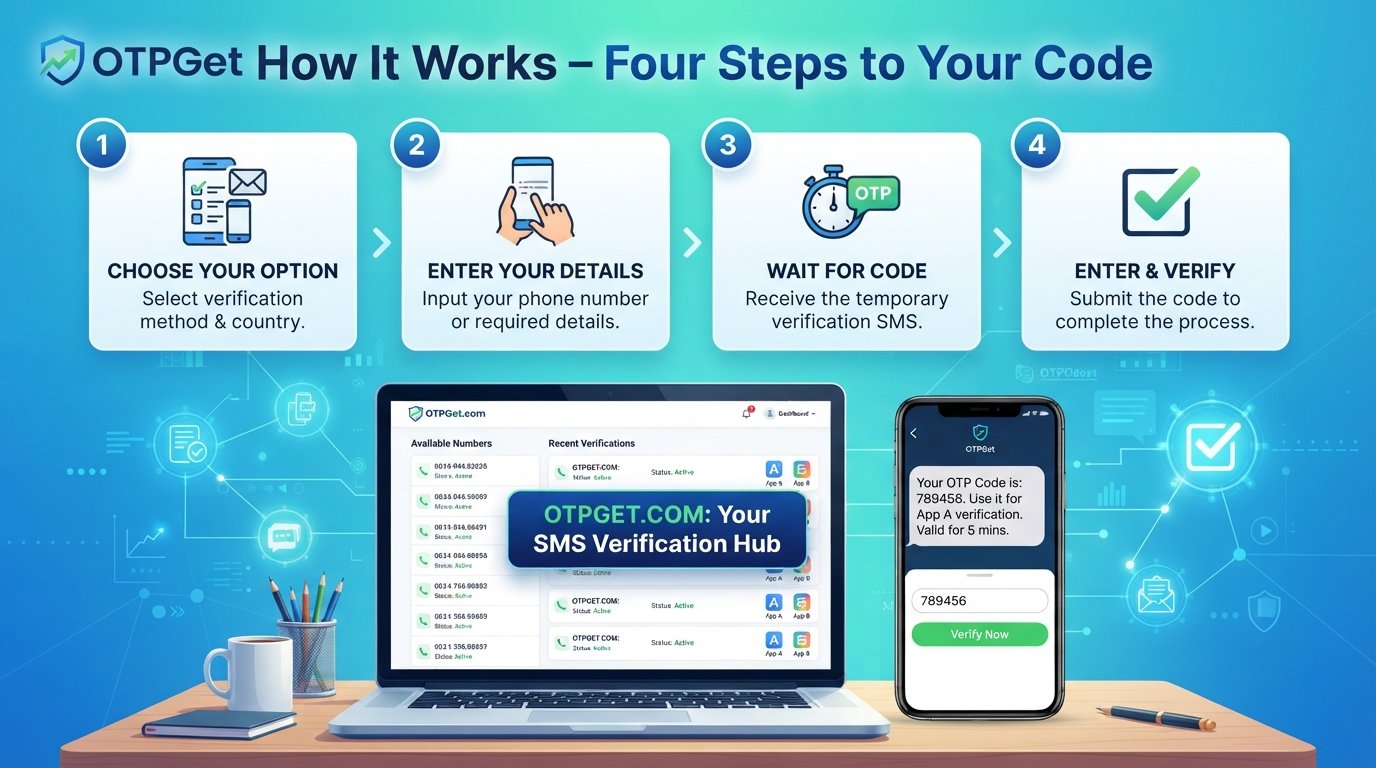
So, how does OTPGet work? The answer can be understood in four simple steps: choose the verification option, enter the required details, wait for the code, and enter the OTP to complete verification. This guide walks through each stage while explaining what OTP verification is, why it is used, and what to consider when choosing an OTP service.
What Is OTP Verification?
OTP verification is a method used by websites, applications, and online services to confirm access to a phone number or another supported verification channel.
OTP stands for one-time password. Rather than using a permanent password, the user receives a temporary verification code. That code is then entered into the relevant verification field.
For example, a service may ask you to verify a phone number during account registration. After starting the process, a verification SMS containing an OTP code may be sent to the number associated with the verification request. Entering the correct code allows the service to continue the verification process.
The basic flow is straightforward:
-
A verification request is started.
-
A temporary OTP code is generated.
-
The code is delivered through the available verification channel.
-
The user enters the code.
-
The service checks the code and completes verification if it is valid.
OTPGET fits naturally into this type of workflow by helping users approach OTP and verification-code processes in a clear, structured way.
Why Do People Need OTP Verification?
Phone verification is common because online services often need a practical way to confirm that a user has access to a particular number.
Legitimate uses can include:
-
Account registration: Confirming a phone number when creating an account.
-
Login verification: Adding an extra verification step during sign-in.
-
Identity confirmation: Checking that a user can access the submitted contact method.
-
Password recovery: Helping verify access when recovering an account.
-
Two-factor authentication: Using an OTP as an additional authentication factor.
-
Online services: Completing a phone number verification step before accessing certain features.
The purpose is generally simple: provide a temporary code that can be used to confirm access.
The challenge is that users do not always know what to expect. A verification page may ask for a number, an SMS may take a moment to arrive, or multiple codes may create confusion. Understanding how the process works can make the experience much easier to navigate.
OTPGet How It Works: Four Simple Steps
The easiest way to understand OTPGet how it works is to break the process into four stages.
1. Choose the Verification Option
The first step is to identify the verification option required by the service you are using.
Depending on the situation, this may involve selecting a phone number or another available verification method. The important point is to understand what the verification page is asking you to provide before continuing.
This is where OTPGET can help simplify the overall experience. Instead of treating OTP verification as a confusing technical process, think of it as a sequence of clear actions: select the appropriate option, provide the requested information, receive the code, and verify it.
Before moving forward, make sure the selected verification method matches the requirements shown on the service's verification page.
2. Enter the Required Number or Details
Once the verification option has been selected, enter the required number or information carefully.
If the process involves a phone number, check every digit before submitting it. A small mistake can prevent the verification SMS from reaching the intended destination.
At this stage, it is useful to pay attention to:
-
The number format requested by the service
-
Any country or area selection
-
Whether the verification page confirms your submitted details
-
Any instructions about requesting or receiving the OTP
A careful second check can save time later. If the information is entered incorrectly, you may need to restart part of the verification process.
3. Wait for the Verification Code
After the verification request is submitted, the next step is to wait for the verification SMS or OTP code.
The code is usually temporary, so there is no need to keep requesting new codes immediately. Give the message a reasonable moment to arrive and watch for the latest verification message.
When the code arrives, check that it corresponds to the current verification request.
This matters because requesting multiple OTPs can sometimes leave users unsure about which code to enter. If several messages arrive, the newest valid code is generally the one to pay attention to, provided the service's instructions say otherwise.
With OTPGET, the goal is to make this part of the verification journey easier to understand: request the appropriate verification option, wait for the message, and identify the OTP you need.
4. Enter the OTP and Complete Verification
The final step is to enter the verification code into the field provided by the website or application.
Enter the digits carefully. If the code is correct and still valid, the service can complete its verification process.
If verification succeeds, you can continue with the relevant account, login, registration, or online service.
The four-step process can therefore be summarized as:
-
Choose the appropriate verification option.
-
Enter the required number or details.
-
Receive and identify the verification code.
-
Enter the OTP and complete verification.
That simple sequence is the foundation for understanding how OTPGET relates to the broader OTP verification process.
Why OTPGET Can Make Verification Simpler
OTP verification itself is not especially complicated, but unclear instructions can make it feel that way.
A straightforward solution such as OTPGET can be useful for people who want a clear understanding of the process rather than having to figure out each stage on their own.
The practical advantages of a simple workflow include:
-
Simplicity: The process can be understood as four clear actions.
-
Convenience: Users can focus on the verification task rather than unnecessary complexity.
-
Clarity: Each stage has a specific purpose.
-
Less confusion: Understanding when to select, enter, wait, and verify can reduce mistakes.
-
A smoother experience: A structured approach makes the verification journey easier to follow.
Rather than viewing OTP verification as a technical obstacle, OTPGET helps position it as a predictable sequence of steps.
OTPGET vs. Traditional Verification Methods
There is a difference between manually dealing with phone verification and using an OTP or verification service as part of the process.
| Traditional/manual approach | OTP or verification service approach |
|---|---|
| May require managing verification details independently | Provides a more structured verification workflow |
| Users may be unsure what to do next | The process can be broken into clear stages |
| Code delays can cause uncertainty | Users can follow a defined receive-and-enter process |
| Repeated requests can create confusion | A clear workflow helps users focus on the latest valid code |
| More room for user error | Simple instructions can reduce avoidable mistakes |
This does not mean every verification service is identical, or that one approach is appropriate for every situation. The right option depends on the service being verified, its requirements, and the user's circumstances.
For someone specifically looking for a simple way to understand OTP verification, OTPGET provides a practical framework built around the four essential steps.
Common Problems With OTP Verification
Even a simple verification process can occasionally run into problems.
Code Delays
An OTP message may not appear immediately. Network conditions, the sending service, or other factors can affect delivery.
Expired Codes
OTP codes are temporary. If a code has expired, entering it may not complete verification, and a new code may be required.
Incorrect Codes
Typing one digit incorrectly is enough for verification to fail. Carefully compare the received code with the digits entered on the verification page.
Not Receiving an SMS
If a verification SMS does not arrive, check the submitted number and follow the instructions provided by the service. Avoid repeatedly requesting codes in rapid succession.
Confusion Between Multiple Codes
If several verification messages have been requested, users may accidentally enter an older code. Pay attention to the latest instructions and use the currently valid code where applicable.
A straightforward workflow can reduce much of this confusion. That is one reason understanding OTPGET and the basic four-step process is useful.
Tips for a Smooth OTP Verification Experience
A few simple habits can make online verification easier:
-
Check the number carefully before submitting it.
-
Wait briefly if the verification SMS does not appear immediately.
-
Check whether the OTP has expired before entering it.
-
Use the latest valid code when multiple messages have been received.
-
Avoid repeatedly requesting codes too quickly, as this can make it harder to identify the correct message.
-
Follow the verification page's instructions rather than guessing what to do next.
-
Enter the code carefully to avoid unnecessary failed attempts.
These steps may sound obvious, but they address many of the frustrations people encounter during phone number verification.
Is OTPGET Right for You?
OTPGET may be worth exploring if you are looking for a straightforward way to understand the OTP verification process and want the journey explained in practical terms.
It can be particularly relevant to people researching:
-
How OTP verification works
-
How to receive a verification code
-
SMS verification processes
-
Phone number verification
-
Temporary or virtual phone number concepts
-
Online verification services
-
The typical steps involved in receiving and entering an OTP
At the same time, no single verification approach is right for every situation. Always consider the requirements of the website or application you are using and follow its verification instructions.
The biggest advantage of the OTPGET approach is its simplicity. Instead of overcomplicating the process, it focuses on understanding the four actions that matter: choose, enter, receive, and verify.
Frequently Asked Questions About OTPGET
What is OTPGET?
OTPGET is a solution associated with the OTP and verification-code process. It can be understood through a simple four-step workflow: choose the verification option, enter the required details, receive the code, and enter it to complete verification.
How does OTPGET work?
The OTPGet how it works process can be broken down into four stages. You choose the appropriate verification option, enter the requested number or details, wait for the OTP or verification SMS, and then enter the code to complete the process.
How do I receive an OTP verification code?
Typically, you begin the verification process, provide the required phone number or verification details, and wait for the service to send an OTP through its supported channel. Follow the instructions displayed by the service you are verifying.
What is an OTP verification code?
An OTP verification code is a temporary password or set of digits used to confirm access to a phone number or another verification method. It is generally intended for a specific verification attempt.
Why do I need SMS verification?
SMS verification can help an online service confirm that a user has access to the phone number provided during registration, login, recovery, or another verification process.
What should I do if I do not receive an OTP?
First, check that the entered number is correct and wait briefly for the message. If it still does not arrive, follow the service's instructions for requesting another code. Avoid making repeated requests too quickly.
Is OTP verification different from phone number verification?
They are closely related but not exactly the same concept. Phone number verification is the broader process of confirming access to a number, while an OTP is one method that can be used to perform that confirmation.
Final Thoughts: A Simpler Way to Understand OTP Verification
OTP verification does not need to be confusing. At its core, the process is about confirming access through a temporary verification code.
The OTPGET approach makes the process easy to understand by breaking it into four practical steps:
-
Choose the verification option.
-
Enter the required number or details.
-
Wait for the verification code.
-
Enter the OTP and complete verification.
That structure helps explain what happens at each stage and what to look for when something does not go as expected.
Whether you are researching SMS verification, phone number verification, online verification codes, or OTP services, understanding the basic workflow is the best place to start. OTPGET provides a practical way to approach that process without unnecessary complexity.
If you are exploring a simpler approach to OTP verification, take the next step by exploring OTPGET and seeing how its four-step workflow fits your verification needs.
Suggested Internal-Link Opportunities
-
Anchor: "how OTP verification works"
Placement: Link from the introductory explanation of OTPs to a broader educational guide. -
Anchor: "SMS verification services"
Placement: Link from the section comparing verification approaches to a relevant service or category page. -
Anchor: "receive a verification code"
Placement: Link from the four-step process to a guide explaining the code-receiving process. -
Anchor: "phone number verification"
Placement: Link from the FAQ or use-case section to a dedicated phone verification resource. -
Anchor: "OTP verification services"
Placement: Link from the section discussing OTPGET and verification solutions to a relevant service page.