WhatsApp Verification With Netherlands Number | OTPGET Guide
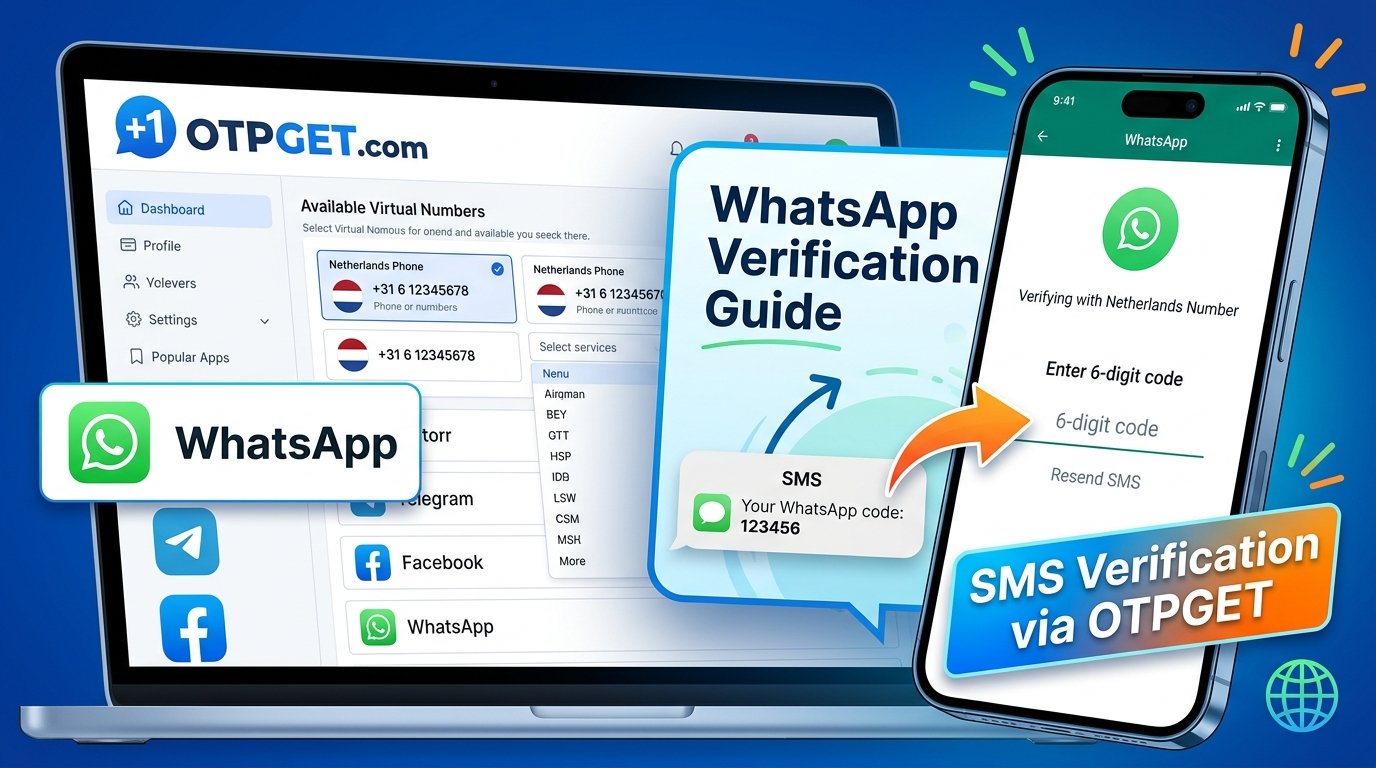
WhatsApp Verification With Netherlands Number: Quick Guide
Verifying WhatsApp with a Netherlands number can be useful when you need a Dutch contact number for international communication, travel, or a legitimate business communication workflow. However, choosing a number is only the first step. You also need to ensure that the number can receive verification messages and is accepted by WhatsApp.
This is where OTPGET may be worth exploring. OTPGET provides virtual phone numbers and SMS verification services, and its published service information lists WhatsApp among the supported platforms. Its service directory also identifies Netherlands numbers, although availability and successful verification depend on the specific number and WhatsApp's requirements.
In this guide, you'll learn how WhatsApp verification with Netherlands number options works, how to evaluate OTPGET, what to do if an OTP does not arrive, and how to protect your account before using a virtual number.
Why Use a Netherlands Number for WhatsApp Verification?
A Netherlands phone number can be useful when your communication needs involve Dutch contacts or international audiences. It may also help separate eligible business communications from your personal messaging, provided the number and intended use comply with WhatsApp's rules.
Common reasons to consider a Dutch number include:
-
International communication: Maintain a contact number suitable for communicating with customers, colleagues, or contacts in the Netherlands.
-
Travel and relocation: Explore Dutch-number options when preparing for an extended stay or managing international communications.
-
Business organization: Keep eligible business communications separate from personal conversations.
-
Testing and development: Use an appropriate number for authorized testing of SMS-based workflows.
-
Number privacy: Consider a separate number when you have a legitimate reason not to distribute your primary contact number.
A Netherlands number is not automatically necessary simply because you communicate with Dutch contacts. Choose one based on your actual requirements, number ownership, privacy expectations, and ability to maintain access.
What Is a Netherlands Virtual Phone Number?
A Netherlands virtual phone number is a telephone number provided through a service rather than necessarily through a traditional physical SIM card in your phone.
Depending on the provider, a virtual number may receive SMS messages through an online interface or another supported system. Some numbers are intended for a single verification session, while others are available for longer-term use.
Virtual numbers versus conventional mobile numbers
A conventional mobile number is usually linked to a SIM or eSIM issued by a mobile operator. A virtual number may instead be managed through an online provider, with access and message delivery depending on the provider's infrastructure.
Before choosing a Netherlands virtual phone number, consider these differences:
-
SMS capability: Not every virtual number can receive messages from every platform.
-
Number access: Some numbers are temporary, while others may be available for an extended period.
-
Ownership and control: Access to a number through a provider does not necessarily mean you have exclusive, permanent control over it.
-
Compatibility: WhatsApp decides whether a number is eligible for registration.
-
Recovery: You may need continued access to the number to verify your identity or recover your account.
For an important WhatsApp account, a personally controlled mobile number or another number you can reliably retain may be a better choice than a temporary or shared number.
How OTPGET Can Help With Netherlands Number Verification
OTPGET is a virtual-number and OTP-verification service. Its published website describes temporary numbers, rental numbers, SMS verification, and other tools, and its service information lists WhatsApp and the Netherlands among its offerings. These listings provide a starting point for evaluating whether the service matches your needs.
For someone exploring an OTPGET Netherlands number, the key question is not simply whether a Dutch number appears in a service directory. You also need to confirm that the specific number is available, supports the intended verification workflow, and can be used consistently with WhatsApp's requirements.
Before proceeding, check:
-
Whether WhatsApp is listed as a supported service.
-
Whether a Netherlands number is currently available for that service.
-
Whether the number is temporary or intended for longer-term use.
-
What the provider says about message retrieval, access duration, and applicable charges.
-
Whether the provider's terms and privacy practices meet your needs.
OTPGET is a separate service, not an official WhatsApp product or partner. Using it does not guarantee that WhatsApp will accept a particular number or deliver a verification code.
How to Verify WhatsApp With a Netherlands Number Using OTPGET
The following process explains how to approach WhatsApp verification with a Netherlands number while checking compatibility and protecting your account.
The exact steps depend on OTPGET's current service options and interface. No particular button, number, or delivery outcome is assumed.
1. Visit the official OTPGET website. Open otpget.com and review the available information about virtual numbers and SMS verification.
2. Check WhatsApp support. Look for WhatsApp in the provider's service listings and read any conditions relevant to your intended use. Do not assume that support for other platforms means WhatsApp registration will work.
3. Check Netherlands number availability. Confirm that a Dutch number is offered for the required service and is actually available when you need it.
4. Review the terms and privacy implications. Understand the number type, any applicable costs, the period of access, and whether messages or codes could be visible to other users.
5. Follow the provider's instructions. If a suitable option is available, use the provider's documented process to obtain and access the number. Do not rely on an assumed interface or undocumented functionality.
6. Enter the number into WhatsApp when appropriate. Select the Netherlands as the country and enter the complete number in the requested format. A Dutch international number begins with country code +31. Follow WhatsApp's instructions and use only a number you are authorized to register.
7. Complete the official verification process. Request the registration code through the method WhatsApp offers for your account and number. Delivery may depend on the number type, network, and platform restrictions.
8. Retrieve and enter the OTP through the authorized workflow. If OTPGET supports receiving the relevant message for the selected number, follow its documented instructions. Enter the code only in the official WhatsApp verification screen.
9. Confirm the result and secure your account. If registration succeeds, enable WhatsApp's available additional security features and confirm that you can retain access to the registered number.
WhatsApp requires an active phone number that the user owns and can verify. Its official guidance explains that registration codes are delivered through supported verification methods, including SMS or phone calls where available.
If the number is rejected or the code does not arrive, do not repeatedly purchase numbers or request codes. Check compatibility first and follow the troubleshooting guidance below.
Benefits of Using OTPGET for Supported Verification Needs
For users considering a virtual number, OTPGET offers a place to investigate available verification options without having to begin with a conventional mobile-number provider. Its published service information describes both temporary and rental virtual numbers, with availability depending on the selected country and service.
Here are the practical benefits to evaluate before choosing an option.
A convenient way to explore available numbers
A service directory can help you determine whether Netherlands numbers are offered for your intended verification task. Checking availability before proceeding reduces the risk of selecting a number that does not match your requirements.
Options for different verification needs
A temporary number and a longer-term rental number serve different purposes. Temporary access may suit an eligible, low-risk test, while a longer-term option may be more appropriate when continued access is important. Neither option guarantees acceptance by WhatsApp.
A more informed verification process
Reviewing the supported services, number type, instructions, and privacy conditions helps you make a better decision before attempting registration. This is particularly useful if you have never used an SMS OTP service.
The important distinction is that convenience does not equal compatibility. Evaluate the specific service and number rather than assuming that every available option will work.
Common Problems With WhatsApp OTP Verification
Even when a number appears suitable, registration may not proceed as expected. These are common problems and the safest ways to address them.
The Netherlands number is unavailable
Number availability can change. Check OTPGET's current listings and confirm that the intended service is supported. If the required option is unavailable, wait or consider a legitimate alternative number provider.
WhatsApp does not accept the number
WhatsApp may reject numbers that do not meet its registration requirements. Virtual, temporary, shared, or previously used numbers may be unsuitable.
Check that the number is entered correctly and that your intended use complies with WhatsApp's terms. If the platform continues to reject it, use a number you control that meets its requirements.
The WhatsApp verification code does not arrive
Start by checking the international number format and confirming that the selected number supports the required messages. Review the provider's instructions and any available delivery-status information.
Wait for WhatsApp's countdown or retry instructions before requesting another code. Repeated requests may trigger additional restrictions rather than solve the problem. WhatsApp's official troubleshooting guidance also recommends checking the full international number and waiting for the permitted retry period.
The number has already been used
A previously assigned number may still be associated with an existing WhatsApp account. This can create account-access or recovery complications, including a request for a previous account's additional security credentials.
Do not attempt to access another person's account. If you cannot establish legitimate control of the number or complete the official process, choose a number you can properly control.
The SMS service does not support WhatsApp
A service that receives verification messages from one platform may not receive them from another. Confirm the specific service listing and any restrictions that apply to the number you selected.
Verification attempts are temporarily restricted
Too many attempts or incorrect codes may result in a temporary restriction. Stop requesting codes, wait for the period indicated by WhatsApp, and follow its official instructions. Avoid switching repeatedly between numbers or devices in an attempt to force verification.
Is It Safe to Use a Netherlands Number for WhatsApp?
Safety depends on who controls the number, who can access incoming messages, and whether you can retain access over time. A virtual number is not automatically unsafe, but temporary and shared numbers introduce risks that deserve careful consideration.
Protect your verification code
A WhatsApp registration code is a security credential. Never share it with strangers, online contacts, or anyone claiming to be a support representative who needs the code to help you.
If a number uses a publicly accessible or shared inbox, another person may be able to see messages or verification codes. That can expose your account to unauthorized access.
Think about future account recovery
A number that works for initial registration may not remain available to you. If you lose access and WhatsApp later requires another verification, you may have difficulty recovering the account.
Before registering, ask yourself:
-
Can I retain access to this number?
-
Can anyone else see its incoming messages?
-
Could the number be reassigned or reused?
-
Can I receive verification messages when traveling or changing devices?
-
Does the service's privacy policy explain how messages and account information are handled?
For an important personal or business account, a dedicated number under your control is generally preferable to a public or disposable number.
WhatsApp also advises users never to share their registration code and explains that account registration requires verification of the relevant phone number.
Tips for Successful Netherlands WhatsApp Verification
A few practical checks can help you avoid common mistakes when using a Dutch phone number for verification.
-
Use the correct international format. Select the Netherlands and enter the number as requested, using the +31 country code. Avoid duplicating the country code or adding an unnecessary leading zero to the national number.
-
Confirm compatibility before paying. Check that both the number and the intended SMS verification service are supported.
-
Understand the number type. Make sure a temporary number is appropriate for your needs, especially if future account recovery matters.
-
Follow WhatsApp's instructions. Use the official registration screen and the verification method actually offered to you.
-
Avoid repeated requests. Wait for the displayed countdown or retry instructions before trying again.
-
Protect your OTP. Enter the code only in the official verification workflow. Never post it in a chat or send it to a third party.
-
Keep long-term access in mind. Choose a number you can continue to control if you intend to use the account regularly.
-
Enable additional security. Use WhatsApp's available two-step verification or other account-security options after registration.
These precautions can improve your preparation, but they cannot guarantee that WhatsApp will accept a particular Netherlands number.
Why Consider OTPGET?
If you need a Dutch number for a supported online verification workflow, OTPGET is a practical service to investigate. Its published information lists virtual numbers, SMS OTP services, and WhatsApp among its offerings, giving prospective users a starting point for checking suitable options.
Its relevance comes down to three questions: Is a Netherlands number available? Is the intended service supported for that number? Can you use the number safely and retain the access your account requires?
Answer those questions before proceeding. If the available options meet your needs, follow the provider's instructions and WhatsApp's official verification process.
Ready to explore your options? Visit the official OTPGET website, review the available services, and confirm current Netherlands number support, applicable terms, and privacy conditions before making a selection.
Frequently Asked Questions
1. Can I verify WhatsApp with a Netherlands number?
Yes, provided WhatsApp accepts the number and you can complete its verification process. A Dutch number must meet the platform's requirements and be capable of receiving the required verification message. Virtual numbers are not universally accepted, so confirm compatibility before relying on one.
2. What is a Netherlands virtual phone number?
A Netherlands virtual phone number is a Dutch telephone number managed through a provider's online infrastructure rather than necessarily through a physical SIM card. Depending on the service, it may support SMS reception for certain platforms. Availability, exclusivity, message access, and long-term control vary by provider and number type.
3. How can OTPGET help with WhatsApp verification?
OTPGET publishes information about virtual numbers and SMS OTP services, including WhatsApp-related verification options. You can review its service listings and check whether a Netherlands number is available for your intended use. Actual compatibility and code delivery depend on the selected number and WhatsApp's requirements.
4. Can I receive a WhatsApp OTP online?
You may be able to receive an OTP online if the selected number supports WhatsApp verification and the provider can receive the message. However, not every online SMS service supports every platform. Use only an authorized workflow, protect your code, and avoid shared inboxes for accounts requiring long-term security.
5. Why is my Netherlands verification code not arriving?
Possible reasons include an incorrect international number format, an unsupported virtual number, network delays, or temporary restrictions on verification attempts. Check the number, review the provider's instructions, and wait for WhatsApp's retry timer. If the issue continues, use an eligible number you control and follow official troubleshooting guidance.
6. Does every virtual Netherlands number work with WhatsApp?
No. A number may be unavailable, previously used, unable to receive the required message, or rejected by WhatsApp. A provider listing does not guarantee registration. Check the specific service and number type, and make sure you can maintain legitimate access to the number.
7. Is it safe to use an online SMS verification service?
It depends on the provider, number type, message visibility, and your ability to retain access. Shared inboxes can expose verification codes, while temporary numbers can create account-recovery problems. Review the provider's terms and privacy practices, never share your OTP, and prefer a personally controlled number for important accounts.
8. What should I do if WhatsApp rejects my number?
Check that you selected the correct country code and entered the full number in the requested format. Confirm that the number meets WhatsApp's requirements and that you control it. If it remains rejected, stop repeated attempts and use another eligible number through a permitted method. Follow WhatsApp's official guidance rather than trying to bypass its restrictions.
Final Thoughts
WhatsApp verification with Netherlands number options can be useful for international communication and eligible business needs, but choosing the right number requires more than finding one that appears available.
Check number compatibility, confirm SMS support, understand privacy and account-recovery risks, and follow WhatsApp's official instructions. OTPGET is one option to explore for supported virtual-number and SMS verification services, but neither number availability nor OTP delivery guarantees successful registration.
Visit the official OTPGET website to review available services and confirm whether a Netherlands number is currently supported for your intended verification workflow. Choose carefully, protect your verification code, and prioritize long-term control of your WhatsApp account.


