Spotify Second Account: Beginner Setup & Verification Walkthrough
Spotify Second Account: A Beginner Setup Guide
Creating a Spotify second account can be useful when you want to keep different listening habits, playlists, or account environments separate. Maybe one account is for your personal music and another is for shared listening. Or perhaps you simply want a fresh Spotify profile without changing the way you use your existing account.
The basic account setup is usually straightforward, but phone verification can sometimes add an extra step. If Spotify requests a phone number and you need an appropriate number to receive an SMS verification code, an online verification service such as OTPGET can be a practical option.
This guide explains the process from account creation to verification, including what to do when a verification SMS does not arrive.
Why Would You Need a Second Spotify Account?
There are several legitimate reasons to create another Spotify account. The main benefit is separation: each account can have its own profile, preferences, playlists, and listening history.
For example, you might want to:
- Keep personal and shared listening separate.
- Maintain different music preferences or recommendation environments.
- Organize separate playlists and listening profiles.
- Keep an additional account available for a different household or personal use case.
- Start with a clean account rather than changing an established profile.
A second account can make sense when managing everything under one profile becomes inconvenient. The important point is to use additional accounts responsibly and in accordance with Spotify's applicable rules.
Can You Create a Second Spotify Account?
Yes, you can generally go through Spotify's signup process to create another account, provided you meet the requirements presented during registration.
Think of the process as a separate Spotify account setup rather than an extension of your existing profile. You may need separate login credentials and other information requested during signup.
Spotify's registration flow and verification requirements can change, so it is best to follow the instructions displayed in Spotify's official signup process rather than relying on an old screenshot or a fixed set of menu names.
If phone verification is requested, completing that step may be necessary before you can finish registration.
What You Need to Set Up a Second Spotify Account
Before starting your Spotify second account setup, have the basic information you may need ready.
Typically, this can include:
- An email address or other account credential requested during signup.
- A strong password.
- Required profile or registration information.
- A phone number if Spotify asks for one.
- Access to the verification code if SMS verification is required.
Not every signup experience will necessarily request the same information. Verification requirements can depend on the signup flow and other factors, so follow the instructions shown at the time of registration.
If a phone number is required but you do not want to use your regular number for this particular account, an online phone number for Spotify may be worth considering where permitted and supported.
Why Does Spotify Ask for Phone Verification?
Phone verification is commonly used by online services as an additional way to confirm access to an account or reduce automated abuse.
When a service requests Spotify phone verification, the general process is simple: you provide a supported phone number, receive an SMS containing a verification code, and enter that code into the relevant verification field.
The code may expire after a limited period, so it is important to use the most recent code you receive.
Phone verification can also help distinguish genuine signup activity from certain automated or suspicious patterns. However, it is not possible to know exactly why Spotify requests verification in every individual case unless Spotify explains the reason directly.
If you see a phone-number prompt during Spotify registration, treat it as part of the account's required verification flow rather than assuming there is a problem with your account.
How OTPGET Can Help With Spotify Verification
If you need a temporary number for Spotify verification, OTPGET can be a practical option to explore.
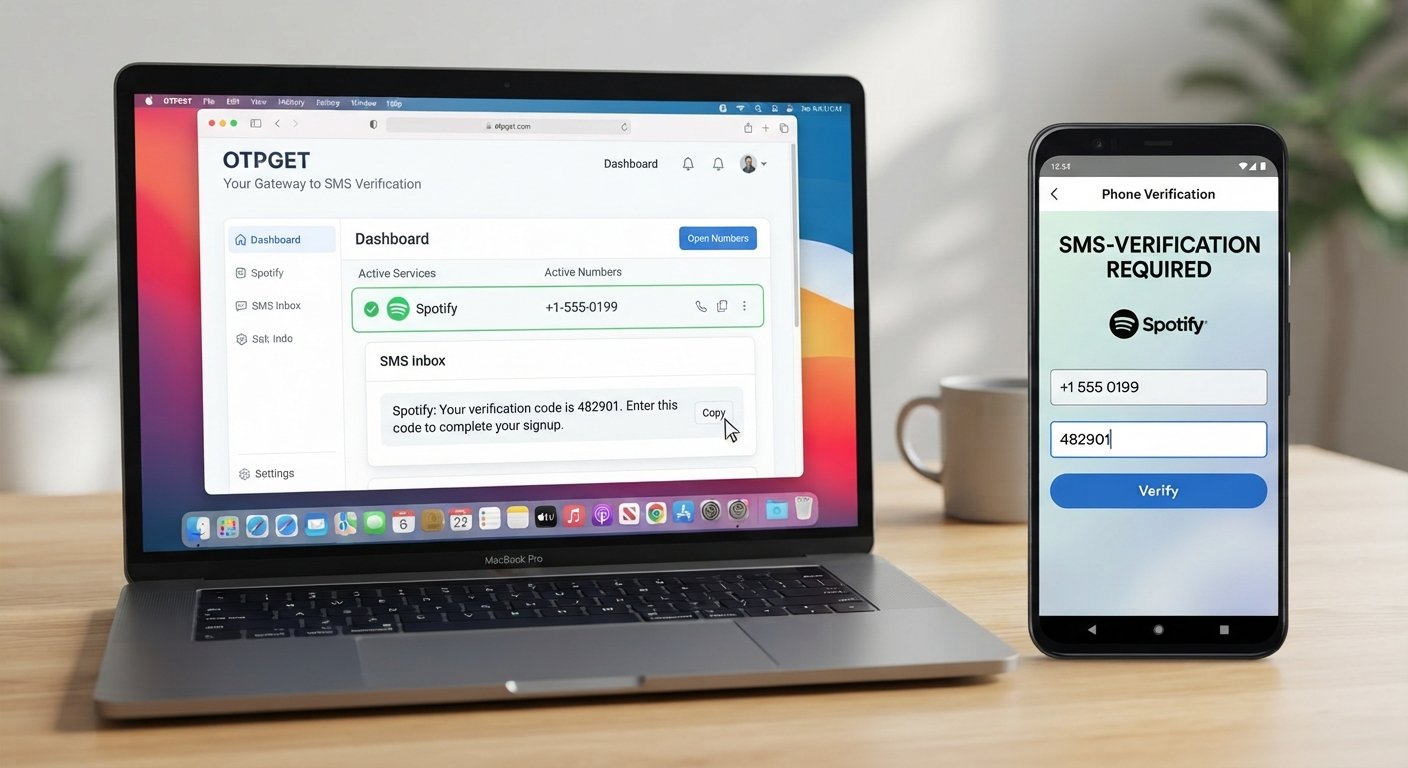
OTPGET is separate from Spotify. It can provide access to online phone-number verification options that may allow users to receive SMS messages for supported services. If a suitable number is available for the service and accepted by its verification system, you can use it to receive the relevant verification SMS.
The basic idea is straightforward:
- Obtain an appropriate number through OTPGET.
- Enter that number into the relevant Spotify verification field.
- Wait for the verification SMS.
- Check OTPGET for the incoming message.
- Enter the received verification code where Spotify requests it.
This can be useful when you need an online phone number rather than using your everyday mobile number.
However, there is an important limitation: not every number will necessarily be accepted by every service. Availability, number type, geographic support, and Spotify's verification requirements can affect whether a particular OTPGET number works for a given signup.
In other words, OTPGET can simplify the phone-verification part when a suitable number is available, but it should not be viewed as a guarantee of successful Spotify verification.
Step-by-Step: Setting Up a Spotify Second Account
Follow these general steps to create another Spotify account.
1. Open Spotify's official signup process
Start from Spotify's current registration page or official app and choose the option to create an account.
Avoid unofficial signup links or pages that request unnecessary personal information.
2. Start creating the additional account
Enter the information requested during registration. Treat this as a separate account and keep its credentials organized independently from your existing account.
3. Complete the required account information
Create a strong, unique password and provide the registration details requested by Spotify.
If Spotify asks for an email address, use one you can access when account recovery or confirmation is needed.
4. Complete any requested verification
If the signup process asks for phone verification, follow the instructions on screen.
This is where you may need to provide a phone number capable of receiving an SMS.
5. Use an appropriate OTPGET number if needed
If you need a temporary phone number for Spotify verification, check OTPGET for an available number suitable for the service.
Use only a number that is legitimately available to you through the service and that is supported for the verification purpose.
6. Check for the verification SMS
Once the number is submitted, check OTPGET for the incoming message.
If the service supports the request and the number is accepted, the message may contain the Spotify verification code required to continue.
7. Enter the verification code
Copy the current code into Spotify's verification field.
Double-check the digits before submitting, especially if the code is short-lived.
8. Finish the account setup
Continue through the remaining Spotify registration steps. The exact flow can vary, so use the instructions presented by Spotify.
9. Secure the new account
Once the account is created, keep the login credentials secure. Do not share passwords or verification codes with other people unnecessarily.
Common Spotify Verification Problems and How to Fix Them
Verification SMS does not arrive
First, wait briefly and check that the number was entered correctly. If the message still does not appear, request another code only when Spotify allows you to do so.
If you are using OTPGET, check whether the selected number is still active and whether messages for the requested service are being received.
The number format is incorrect
Some services require a specific international format. Carefully follow the format requested by Spotify instead of adding or removing country codes at random.
The verification code expired
A verification code may only be valid for a limited time. Request a new code and use the newest message rather than an older one.
The code is rejected
Check that you entered the latest code correctly. Avoid repeatedly submitting an incorrect code because repeated attempts may trigger temporary restrictions or delays.
The number has already been used
If Spotify indicates that a number cannot be used, another supported number may be necessary. When using an online verification service, number availability and previous usage can vary.
The number is unsupported
Not every virtual or temporary number is accepted by every service. If Spotify does not accept a particular number, check whether another supported option is available through your chosen provider.
Verification requests are temporarily limited
Repeated attempts can sometimes result in a delay. Rather than continuously requesting new codes, wait and retry according to the instructions displayed by Spotify.
Tips for Managing Two Spotify Accounts
Once your second Spotify account is active, a little organization can prevent confusion.
- Use separate login credentials: Keep each account's email and password clearly associated with the correct profile.
- Create strong passwords: Avoid reusing the same password across important accounts.
- Keep account information organized: A password manager can help you securely manage multiple logins.
- Protect verification codes: Never post or share an OTP verification code publicly.
- Check which account is active: Before changing playlists or settings, make sure you are signed into the intended profile.
- Use accounts responsibly: Multiple accounts should be used for legitimate personal purposes and in accordance with applicable Spotify rules.
These simple habits make managing a second Spotify account much easier.
Is OTPGET a Good Option for Spotify Verification?
OTPGET can be a useful option when Spotify requests phone verification and you need access to an online or temporary number that can receive an SMS.
Its main advantage is convenience: instead of relying on your everyday mobile number, you can explore available verification-number options through a dedicated service and use a suitable number for the required OTP process.
Still, it is important to keep expectations realistic. OTPGET is not Spotify and is not presented as a Spotify partner or official verification provider. Whether a number is accepted can depend on Spotify's requirements, the number's availability, and other factors outside OTPGET's control.
For that reason, think of OTPGET as a practical verification-number option rather than a guaranteed solution. If you need to receive a Spotify verification code, select an appropriate available number, follow Spotify's instructions, and use the latest code provided to you.
Frequently Asked Questions
Can I have a second Spotify account?
You can generally create another Spotify account by completing Spotify's signup process again and meeting the requirements presented during registration. Keep the accounts and credentials separate and use them responsibly.
How do I create a second Spotify account?
Start a new Spotify signup, enter the requested registration information, complete any verification steps, and finish the setup. If phone verification is required, you will need access to a supported number capable of receiving the requested SMS.
Does Spotify require phone verification?
Phone verification is not necessarily identical for every signup. If Spotify asks for a phone number during your registration, follow the verification instructions provided in that particular signup flow.
How can I receive a Spotify verification code?
If phone verification is requested, enter a supported phone number and wait for the SMS. If you are using OTPGET, check the selected number's incoming messages for the verification code and enter the current code in Spotify's verification field.
Can I use a temporary phone number for Spotify verification?
A temporary number may be an option when it is supported and accepted by the service. Acceptance is not guaranteed, so choose an appropriate number and follow Spotify's current requirements.
What is OTPGET?
OTPGET is a separate online service that can provide temporary or online verification-number options for supported services. It is not affiliated with Spotify unless explicitly stated by the respective companies.
What should I do if my Spotify verification SMS does not arrive?
Check the phone number and country format, wait briefly, and make sure the number is still available to receive messages. If necessary, follow Spotify's retry instructions or consider another supported verification-number option.
Conclusion
Setting up a Spotify second account does not have to be complicated. The basic process involves starting a separate Spotify signup, providing the requested account information, completing any required verification, and securing the new account.
The part that can cause the most confusion is often phone number verification. If Spotify requests an SMS code and you need an online or temporary number, OTPGET can be a convenient option to explore for receiving the required verification message.
Just remember that number acceptance can vary, and no third-party service can promise that every number will work with every Spotify verification request. Use the service responsibly, protect your verification codes, and follow Spotify's applicable requirements.
If you need a suitable number for an OTP or SMS verification step, exploring OTPGET can be a practical next step.
8. SEO Keyword Checklist
- Primary keyword used: Yes — “Spotify second account”
- Secondary keywords used: Spotify second account setup, create a second Spotify account, how to make a second Spotify account, Spotify account verification, Spotify phone verification, Spotify verification code, Spotify SMS verification, Spotify phone number verification, second Spotify account, create another Spotify account, Spotify account setup, Spotify signup, Spotify registration, Spotify verification number, temporary phone number for Spotify, temporary number for Spotify verification, online phone number for Spotify, virtual phone number for Spotify, receive Spotify verification code, OTP verification, SMS verification, receive SMS online, OTPGET, OTPGET verification, OTPGET temporary number, OTPGET SMS verification
- OTPGET mentioned naturally: Yes
- Search intent satisfied: Yes
- Word count: Approximately 1,650 words for the full article body
- Year references: None
- Keyword stuffing: No