DeepSeek Login Without Phone Number: Easy Verification Guide
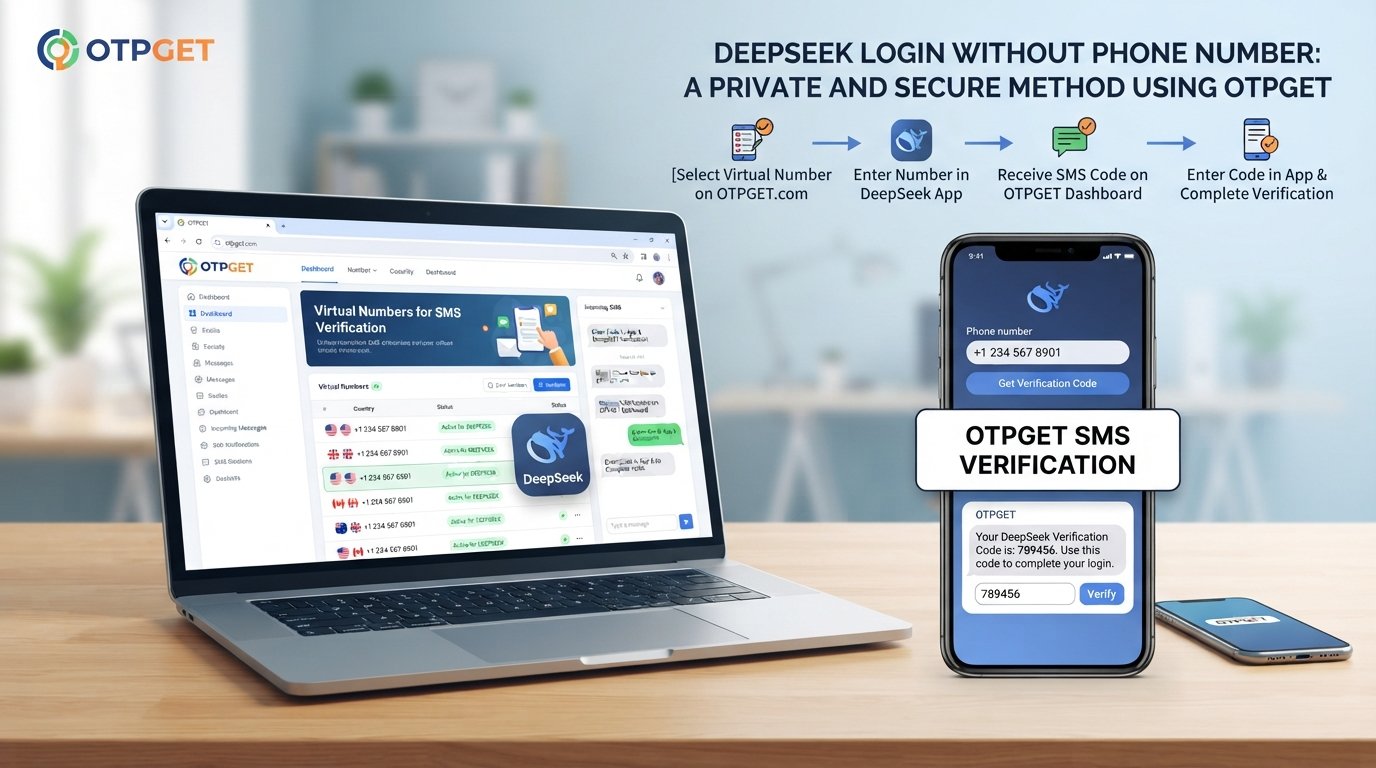
How to Get DeepSeek Login Without Phone Number
Want to use DeepSeek but would rather not connect your personal phone number to another online service? You're not alone. Phone verification can be inconvenient when you want to keep your personal number separate, have trouble receiving international SMS, or simply prefer another verification option.
The important point is that DeepSeek login without phone number depends on the verification methods currently offered to your account and region. DeepSeek's published privacy policy states that account registration and login may require a phone number or email, along with a verification code and password.
When SMS verification is required, a legitimate virtual-number or online SMS verification service can provide an alternative to using your personal mobile number, where the platform accepts that number.
One option worth considering is OTPGET, which provides virtual numbers intended for receiving SMS verification codes. Its published documentation describes selecting a country and service, obtaining a number, and checking for an incoming verification code.
Why Does DeepSeek Ask for Phone Verification?
Phone or email verification is commonly used during account registration and login to confirm that a user can access the contact method being used.
For DeepSeek specifically, its published privacy policy says users need to provide a phone number or email during registration and login and verify their identity with a verification code.
Verification can serve several practical purposes, including:
- Confirming access to the contact method.
- Helping protect accounts from unauthorized access.
- Reducing automated or abusive registrations.
- Providing a channel for account-related verification.
However, the exact verification experience can change depending on the account, registration method, region, and platform interface. Always follow the verification options presented by DeepSeek rather than attempting to bypass them.
Can You Get DeepSeek Login Without a Phone Number?
Yes, in some cases, you may be able to create or access a DeepSeek account without using your personal phone number.
DeepSeek's published privacy policy identifies email as an alternative to a phone number during registration and login.
If the registration flow you're presented with accepts email verification, you can use that legitimate option.
If SMS verification is required instead, another possibility is a virtual phone number or SMS verification service. The key limitation is that DeepSeek must accept the selected number. A third-party service cannot guarantee that a particular number will be accepted.
This is why the goal should not be to defeat DeepSeek's authentication system. Instead, use an available verification method that complies with the service's requirements.
[Internal Link: OTP Verification Guide]
Why Users Look for a Phone Number Alternative
There are several perfectly practical reasons someone may search for a DeepSeek account without phone number.
Privacy and separation
Some users prefer not to associate their personal mobile number with every online account they create.
Keeping personal and online-service communications separate can make account management simpler.
SMS delivery problems
International users may experience delayed or failed SMS delivery. Network problems, carrier restrictions, roaming, or unsupported number formats can all create verification difficulties.
International number limitations
A service may not accept every country code or mobile-number type. A virtual number can sometimes provide another option, subject to the platform's acceptance rules.
A dedicated verification number
Some users simply prefer to keep a separate number for services that require one-time SMS verification rather than using their everyday mobile number.
The important consideration is what happens after registration. If an account needs a phone number later for recovery or additional verification, a temporary number may not be suitable.
How OTP Verification Works
OTP stands for one-time password. In an SMS verification flow, the service sends a short code to the phone number entered during registration.
The basic process looks like this:
- Enter an eligible phone number on the verification screen.
- Request an SMS verification code.
- Wait for the message to arrive.
- Retrieve the OTP from the supported phone or verification service.
- Enter the code into the verification field.
- Complete the normal registration or login process.
The code is normally time-sensitive, so entering it promptly is important.
How OTPGET Can Help With DeepSeek Verification
If DeepSeek presents SMS verification and you don't want to use your personal number, OTPGET is one service you can consider for receiving verification SMS where supported.
OTPGET's documentation describes an SMS OTP workflow in which users select available countries and services, request a number, and monitor its activation status for an incoming code.
The general process is straightforward:
- Visit OTPGET and access the available verification service.
- Check whether an appropriate country and service are available.
- Obtain a suitable virtual number according to the service's current options.
- Enter that number into DeepSeek's normal verification screen.
- Request the verification SMS.
- Monitor the OTPGET interface for the incoming message.
- Enter the received verification code into DeepSeek.
- Continue with the normal registration or login process if the number is accepted.
Availability can change, and not every number will necessarily work with every platform. OTPGET itself states that it provides numbers and message-receiving services but does not control third-party platform restrictions or verification outcomes.
That distinction is important: OTPGET can provide the verification-number infrastructure, while DeepSeek determines whether a particular number is accepted.
Benefits of Using OTPGET for Verification
Using a virtual number can be useful in situations where you don't want to provide your everyday mobile number.
Potential benefits include:
- Separating your personal number: Keep your primary mobile number separate from online services.
- Alternative SMS access: Useful when receiving a verification message on your normal number is inconvenient.
- Online OTP retrieval: Verification messages can be accessed through the supported OTPGET workflow.
- Flexible number options: OTPGET publishes availability across multiple countries and services, although actual availability can change.
- Rental options: For situations where longer access is important, OTPGET also documents rental-number options.
For an account you expect to use for a long time, however, think carefully before choosing a temporary number. Account recovery requirements can make long-term access to the original verification number important.
[Internal Link: Temporary Phone Number Guide]
Step-by-Step: DeepSeek Login Without Your Personal Phone Number
Here's a simple approach for users who encounter SMS verification.
Step 1: Open the normal DeepSeek registration or login page
Start with DeepSeek's regular account-access flow. Do not use unofficial login pages or tools claiming to bypass authentication.
Step 2: Check the available verification methods
If DeepSeek offers email verification, you may be able to use that option instead of a phone number. DeepSeek's published policy identifies email and phone as registration/login contact methods.
Step 3: If SMS is required, consider an eligible virtual number
If you choose an SMS verification service, check the available options before purchasing or requesting a number.
Step 4: Use OTPGET where appropriate
Select an available number through OTPGET and enter it into DeepSeek's normal phone-verification field.
Step 5: Request the OTP
Ask DeepSeek to send the verification message. Then monitor the OTPGET interface for the incoming SMS.
Step 6: Enter the verification code
Once the code arrives, enter it into the DeepSeek verification field.
Step 7: Finish account setup
If DeepSeek accepts the number and code, continue through the standard registration or login process.
If the number is rejected, don't repeatedly attempt to circumvent the restriction. Instead, try another legitimate verification method supported by DeepSeek.
[Internal Link: Online SMS Verification Guide]
Common Problems When Trying to Verify DeepSeek
Even when everything is configured correctly, verification may not work immediately.
OTP isn't arriving
The message may be delayed, the selected number may not be eligible, or the platform may not support that number.
Check the verification status and wait briefly before trying another eligible option.
The number is rejected
Some platforms restrict certain virtual, recycled, or previously used numbers. If DeepSeek rejects the number, select another supported verification method rather than repeatedly submitting the same number.
The code expired
OTP codes are usually temporary. Request a new code and enter it promptly.
SMS delivery is delayed
Network or service-side delays can occur. Avoid submitting multiple requests rapidly, since this can make it harder to determine which code is current.
DeepSeek requires another verification method
A third-party SMS service cannot change DeepSeek's account requirements. If the platform requests email verification or another authentication method, follow the method shown in the official interface.
Is It Safe to Use an OTP Verification Service?
An OTP service can be useful, but users should understand the privacy and account-recovery implications before using one.
Follow these basic precautions:
- Use a legitimate service.
- Never share your DeepSeek password with an OTP provider.
- Don't give third parties unnecessary account information.
- Review the provider's terms and policies.
- Remember that shared or temporary numbers may have privacy limitations.
- Avoid using temporary numbers for accounts where you need dependable long-term recovery.
- Never use an OTP service to access an account you don't own or to circumvent security controls.
OTPGET's own terms state that it provides numbers and message-receiving services and is not responsible for third-party platform restrictions, verification failures, bans, or logout issues.
That makes it especially important to treat an OTP number as a verification tool—not as a guarantee of permanent account access.
OTPGET vs. Using Your Personal Phone Number
| Factor | Personal Number | OTPGET |
|---|---|---|
| Privacy considerations | Your everyday number is shared with the service | Keeps your personal number separate where supported |
| Convenience | Simple if your phone receives SMS normally | Useful when you need an alternative number |
| SMS accessibility | Depends on your carrier and location | Depends on available number/service compatibility |
| Long-term recovery | Generally easier if you retain the number | Temporary numbers may not be suitable for recovery |
| Verification | Uses your own mobile number | Uses a virtual number provided by the service |
| Best use case | Long-term personal accounts | Situations requiring an alternative verification number |
Neither option is universally suitable. If an account is important and depends on SMS recovery, retaining access to the original number may be more practical.
8. FAQ Section
Can I create a DeepSeek account without a phone number?
Potentially. DeepSeek's published privacy policy states that registration and login may use a phone number or email, followed by verification. The options presented to you can depend on the current account-access flow.
How can I receive a DeepSeek OTP without using my personal number?
If DeepSeek requires SMS and accepts the number you select, you can consider a virtual-number service such as OTPGET. The service provides numbers for receiving supported SMS verification codes. Acceptance ultimately depends on DeepSeek.
What is OTPGET?
OTPGET is a virtual-number and OTP verification service. Its published documentation describes SMS OTP numbers, rental numbers, and other verification-related services.
Can OTPGET receive verification codes?
Yes. OTPGET's documentation describes obtaining a number and checking its activation status for an incoming SMS code.
However, receiving an OTP and having a third-party platform accept the number are two different things.
Why isn't my DeepSeek OTP arriving?
Possible reasons include SMS delays, number incompatibility, temporary service issues, or restrictions on the selected number. Check the verification screen, wait for delivery, and consider another legitimate verification option if necessary.
Can I use a temporary number for DeepSeek verification?
You may be able to use one if DeepSeek accepts the number and its verification message. However, temporary numbers can be unsuitable for long-term account recovery because you may not retain access to them.
Is a temporary phone number suitable for long-term account recovery?
Not necessarily. If you expect to need SMS recovery later, a number you permanently control may be more appropriate. Consider the account's recovery requirements before choosing a temporary number.
What should I do if DeepSeek rejects a verification number?
Don't attempt to bypass the restriction. Check whether DeepSeek offers email or another supported verification method. If SMS is required, you can try another eligible number, subject to DeepSeek's rules.
9. Conclusion/CTA
Getting DeepSeek login without phone number doesn't necessarily mean bypassing account verification. Depending on the options shown during registration or login, you may be able to use email instead of a personal phone number. If SMS verification is required, a virtual-number service can provide another legitimate option when the platform accepts it.
OTPGET can be practical for users who need to receive an SMS verification code without using their everyday mobile number. Its documented workflow lets users obtain available numbers and monitor incoming verification messages.
Just keep the limitations in mind: number availability can change, DeepSeek may reject certain numbers, and temporary numbers aren't always appropriate for long-term account recovery.
If you need an alternative verification number, explore the available options on OTPGET and choose a number that fits your legitimate verification needs.


