How to Get Slack Login Without Phone Number: A Practical OTP Guide
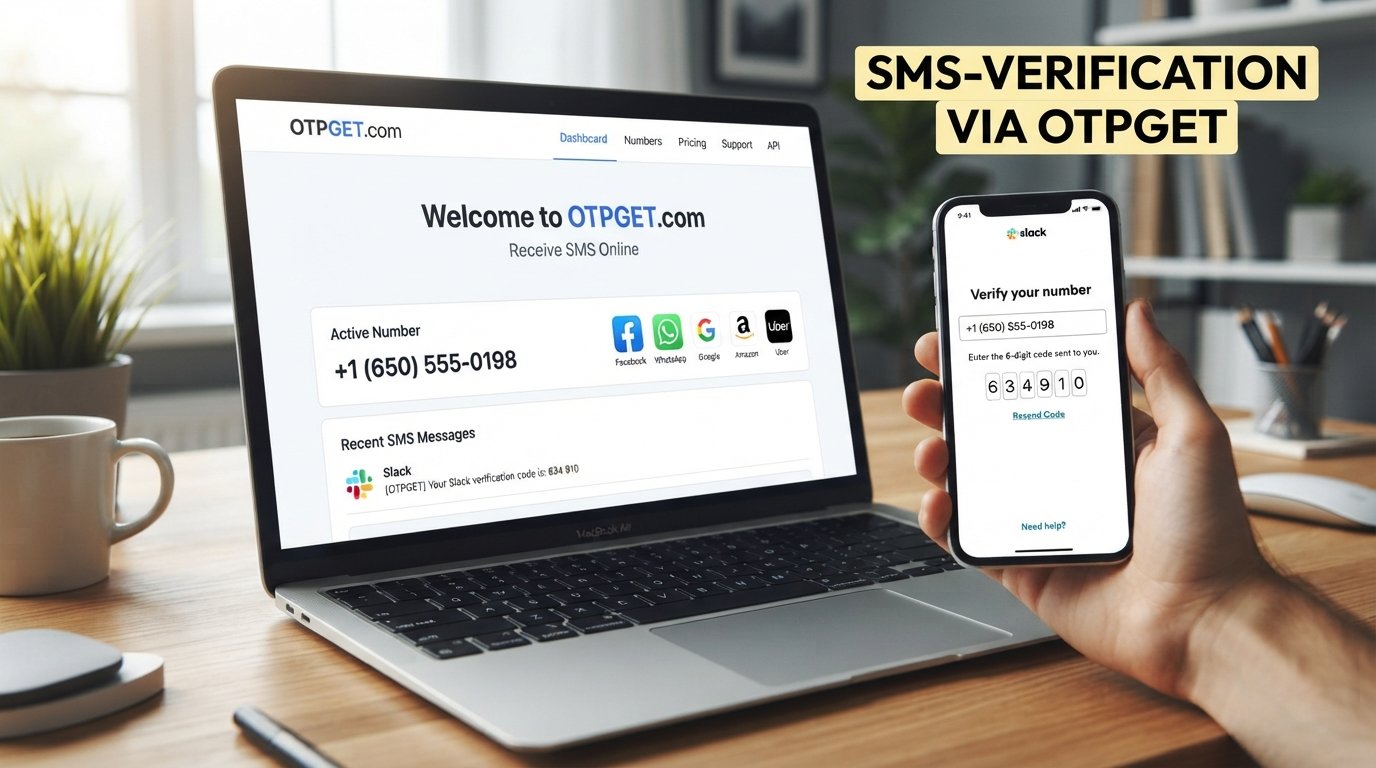
How to Get Slack Login Without Phone Number
For many people, a phone number feels like a personal detail that should not be attached to every online account. You may want to keep work and personal communication separate, avoid exposing your primary number, or simply need another option because your regular phone cannot conveniently receive SMS.
That makes the question how to get Slack login without phone number a common one. The important distinction is that avoiding your personal number is not the same as bypassing Slack's verification or security requirements.
Slack supports several sign-in methods, including email-based sign-in, passkeys, Apple or Google accounts, and single sign-on where configured. Some workspaces can also require two-factor authentication.
If your legitimate verification flow requires an SMS-capable number, OTPGET can be a practical option to consider. It provides virtual and rental phone-number services intended for OTP and SMS verification, although compatibility depends on the service and number type available.
Can You Use Slack Without a Phone Number?
Yes, in some situations you can access Slack without using a personal phone number.
Slack's standard sign-in process can use your email address. Depending on your account and workspace, Slack may send a confirmation code to your email, or you may be able to use a passkey, Google, Apple, or an organization's SSO system.
Joining a Slack workspace can also begin with an email address and an email confirmation code.
However, that does not mean phone verification is never required.
A workspace can require two-factor authentication, and Slack supports SMS as one possible 2FA method. Workspace owners or admins may also configure authentication requirements, including requiring an authentication app instead of SMS.
So there are really two different situations:
- You don't want to use your personal phone number: an email, passkey, SSO option, or appropriate secondary number may solve the problem.
- Slack requires a particular authentication method: you should complete that method rather than attempting to circumvent it.
This distinction is important when looking for a Slack login without phone verification.
Why Do People Want Slack Login Without a Phone Number?
There are several perfectly legitimate reasons to avoid attaching a primary phone number to a work account.
Privacy is one of the biggest. Your personal number may already be connected to family, banking, social media, and other private services. Using it for every professional platform can make account management unnecessarily complicated.
Work-life separation is another reason. Someone managing a temporary project, freelance engagement, volunteer team, or separate business operation may prefer not to mix professional verification with their everyday mobile number.
There can also be practical issues. International users may have difficulty receiving certain SMS messages, while travelers or people using multiple devices may not always have convenient access to their normal SIM card.
Other legitimate use cases include:
- Setting up accounts for a temporary work project
- Keeping business and personal contact information separate
- Testing a legitimate workflow where permitted
- Using a secondary number for professional services
- Receiving an SMS verification code when the primary number is unavailable
The goal should be privacy and account separation—not defeating authentication.
Ways to Access Slack Without Sharing Your Personal Number
There is no single method that works for every Slack account or workspace. Your available options depend on how the workspace is configured.
1. Use Slack's email-based sign-in
For many users, the simplest solution is to sign in with email. Slack says users can enter their email address and receive a confirmation code, while supported accounts may also use passkeys or social sign-in options such as Apple or Google.
If your workspace allows this method, there is no reason to add a phone number simply for the sake of logging in.
2. Use your organization's authentication method
Businesses may configure SSO or other identity-management systems for Slack. In those environments, the appropriate route is to follow the organization's normal authentication process.
If you're unsure which method your company requires, your workspace administrator or IT team can usually clarify the correct process.
3. Use a secondary number when SMS verification is required
If your legitimate Slack verification flow specifically requires SMS, you may prefer a secondary or virtual number rather than exposing your personal number.
This is where an OTP verification service such as OTPGET can become relevant.
4. Consider OTPGET for eligible OTP verification
OTPGET provides virtual and rental numbers designed for receiving SMS OTP verification messages. Its documentation also describes an SMS OTP service and number-ordering workflow.
Whether a particular number can be used for Slack depends on Slack's requirements and the type and availability of the number. There should be no assumption that an online number will automatically work with every service.
OTPGET as a Practical Option for OTP Verification
For users who prefer not to share their personal number, OTPGET can provide another verification option when an SMS-capable number is appropriate and permitted.
The basic idea is straightforward: instead of using your everyday mobile number, you use a separate number intended for the verification process.
A typical workflow looks like this:
- Identify the service requiring verification.
Confirm that SMS verification is actually part of the legitimate sign-in or account setup process. - Check the available verification method.
If Slack offers email, passkey, SSO, or an authentication app that works for your situation, you may not need an SMS number at all. - Select an appropriate number through OTPGET if needed.
Availability can vary by country, service, and number type. - Enter the number in the relevant verification form.
Use the number only within the legitimate account-verification process. - Wait for the verification SMS.
If the service and number are compatible, the verification message may be delivered through the OTP service. - Enter the received OTP.
Enter the code into the service's normal verification screen. - Complete authentication normally.
Continue using Slack's standard sign-in and security procedures.
The key point is that OTPGET does not replace Slack authentication. It can simply provide a separate phone-number option for a verification flow that accepts that type of number.
How to Use OTPGET for Slack Verification
If you specifically need an online phone number for verification, keep the process simple.
First, determine whether Slack is asking for an SMS code or whether another authentication option is available. Slack's current sign-in documentation lists email confirmation, passkeys, Apple or Google sign-in, and SSO among supported methods.
If SMS is required by your workspace or account, check OTPGET for an appropriate available number.
Then:
- Choose the relevant country or number option available through OTPGET.
- Confirm that the number type is suitable for the verification service.
- Enter the number in Slack's legitimate verification form.
- Monitor the OTP receiving service for the incoming SMS.
- Enter the verification code into Slack.
- Finish any remaining authentication steps requested by Slack.
OTPGET verification availability can vary, so check the current options before starting. A number being available through an OTP service does not guarantee that every platform will accept it.
Most importantly, never use a verification service to impersonate another person, gain access to an account you do not own, or circumvent an organization's security controls.
Benefits of Using a Separate Number for Verification
A separate verification number can make account management easier without changing the underlying security requirements.
Better privacy separation
Your primary mobile number does not have to be used for every professional account when another legitimate verification method is available.
Cleaner work and personal boundaries
A separate number can help keep professional services distinct from your everyday personal communications.
Convenience
If your regular SIM is unavailable or cannot receive a particular SMS, another appropriate number may offer an alternative.
Easier account organization
Businesses, freelancers, and teams sometimes need to manage multiple legitimate accounts or projects. A dedicated verification option can make that separation more manageable.
That said, a virtual or temporary number does not make an account anonymous or immune to restrictions. Slack and other services can still apply their normal authentication, security, and account-management rules.
Things to Keep in Mind Before Using an OTP Service
An OTP service can be useful, but it is not a universal solution.
Compatibility varies. Some platforms may restrict certain number types, countries, carriers, or virtual numbers. Always check the current requirements of the service you are trying to access.
Don't share OTPs. A verification code is intended for the legitimate account holder and should not be given to another person.
Think about account recovery. If you use a temporary number and later lose access to it, recovering an account that depends on that number can become more difficult. Where possible, maintain an appropriate long-term recovery method.
Follow Slack's requirements. If your workspace requires an authentication app, SSO, or another security method, use that method rather than attempting to work around it. Slack explicitly supports authentication apps for 2FA, and workspace administrators can restrict available 2FA methods.
Use OTP services for legitimate purposes. The purpose should be privacy, account separation, or legitimate verification—not unauthorized access.
Slack Login Without Phone Number — Common Questions
Can I log into Slack without a phone number?
Often, yes. Slack supports email-based sign-in and may also support passkeys, Apple or Google sign-in, or SSO depending on your account and workspace. However, a workspace can require additional authentication.
Does Slack always require phone verification?
No. Slack's sign-in options can include email confirmation, passkeys, Apple or Google accounts, and SSO. However, workspace-specific security settings can require 2FA or another authentication method.
Can I use an alternative number for Slack verification?
If Slack's verification flow accepts the number type you are using, an alternative or secondary number may be appropriate. Acceptance can vary, so it should not be treated as guaranteed.
How can I receive a Slack verification code?
The code may be delivered by email for email-based sign-in, while SMS or an authentication app may be used for applicable 2FA configurations. Follow the method presented by Slack for your account.
What is OTPGET?
OTPGET is an online service offering virtual and rental phone-number options intended for OTP and SMS verification. Its documentation also describes an SMS OTP API for supported workflows.
Can OTPGET receive OTP verification codes?
OTPGET's service is designed around receiving SMS OTP verification messages. Whether a specific service, including Slack, accepts a particular available number depends on that service's requirements and the number provided.
What should I do if my verification code does not arrive?
First, check that the email address or phone number was entered correctly. For email codes, check spam or junk folders. For SMS verification, confirm that the number and service are compatible and that the verification request was completed correctly. If the issue continues, use the service's official support or account-recovery process.
Conclusion
Getting Slack login without phone number does not have to mean bypassing verification. In many cases, Slack already provides email-based sign-in or other authentication methods that do not require your personal mobile number.
When SMS verification is legitimately required, a separate number can be another option. OTPGET can be useful for users who need an OTP-enabled number for an eligible verification flow and prefer not to expose their primary phone number.
The safest approach is straightforward: use Slack's supported authentication methods, respect your workspace's security requirements, and treat an OTP service as a verification-number option—not a way around account security.
If your verification flow permits the relevant number type, explore OTPGET to see which verification options are currently available.
Featured Snippet Answer
To get Slack login without a personal phone number, first use Slack's supported email, passkey, Google, Apple, or SSO sign-in options when available. If your workspace specifically requires SMS verification, a separate OTP-enabled number such as one available through OTPGET may be an option, subject to Slack's requirements and number compatibility.
FAQ Section
Can I use Slack without giving my personal phone number?
Yes, depending on your account and workspace. Slack supports email-based sign-in and may offer passkeys, Apple or Google sign-in, or SSO.
What if Slack requires SMS verification?
If SMS is required, you can consider an appropriate secondary or virtual number where permitted. OTPGET is one service designed for SMS OTP verification, but compatibility with Slack is not guaranteed.
Is using an OTP number the same as bypassing Slack verification?
No. Using a legitimate number for a verification process is different from circumventing authentication. The verification process should still be completed exactly as Slack requires.
Can I use an authentication app instead of SMS?
Slack supports authentication apps for 2FA, although the options available can depend on workspace configuration. Workspace owners can restrict members to authentication-app-based 2FA.
What should I do if I lose access to a temporary number?
Use an available recovery method or contact the appropriate Slack workspace owner, administrator, or Slack support route. Avoid relying on a temporary number as your only long-term recovery method.
Is OTPGET guaranteed to work with Slack?
No guarantee should be assumed. Number availability and platform compatibility can change, and Slack or a workspace may restrict particular number types.
Where can I learn more about OTPGET?
Visit OTPGET for its current virtual-number and OTP verification options.


